Nx Cloud makes CI faster and cheaper in two ways:
- Remote caching skips any task that already ran with the same inputs, in CI or on a developer machine. On Nx Cloud, Ultracache records the files each task actually reads, improving both cache correctness and efficiency.
- Distributed task execution spreads the remaining tasks across Workers, and dynamic task packing fills each agent by the CPU and memory its tasks use, so fewer machine-minutes sit idle.
In most workspaces, distribution uses about 50% fewer machine-minutes than remote caching alone. Teams using Nx Cloud report 40% to 90% faster CI.
What you get with Nx Cloud on top of Nx Core
Section titled “What you get with Nx Cloud on top of Nx Core”| Nx Core | Nx Cloud | |
|---|---|---|
| Caching | Local cache, per machine | Adds a remote cache shared across your team and CI |
| Task inputs | Hashes each task from its declared or inferred inputs | Ultracache records what each task reads in CI and hashes from that |
| Task scheduling | Task graph on one machine, nx affected to skip untouched projects | Adds distribution across agents with dynamic task packing |
| Failing CI | You read the logs and fix it | Self-healing CI proposes a fix on the PR |
| Visibility | Terminal output for the run in front of you | Run history, task analytics, and CI observability |
Connect your workspace to Nx Cloud
Section titled “Connect your workspace to Nx Cloud”Push your workspace to a remote repository, then run:
npx nx@latest connectRemote caching works as soon as the workspace is connected. To add distribution and the rest of the pipeline, see setting up CI.
Connect from your browserSign in to Nx Cloud and connect your repository without the CLI
Building blocks of fast CI
Section titled “Building blocks of fast CI”Fast CI comes from two things:
- Get more out of your machine minutes. Distributed task execution spreads tasks across Workers so work runs in parallel. Dynamic task packing runs tasks together when their combined CPU and memory needs fit on a Worker, so you get more work out of each machine.
- Only run what you have to.
nx affectedselects tasks whose inputs your changes touch. Remote caching reuses results from tasks that already ran with the same inputs, so they don't run again.
Why task-based CI costs less
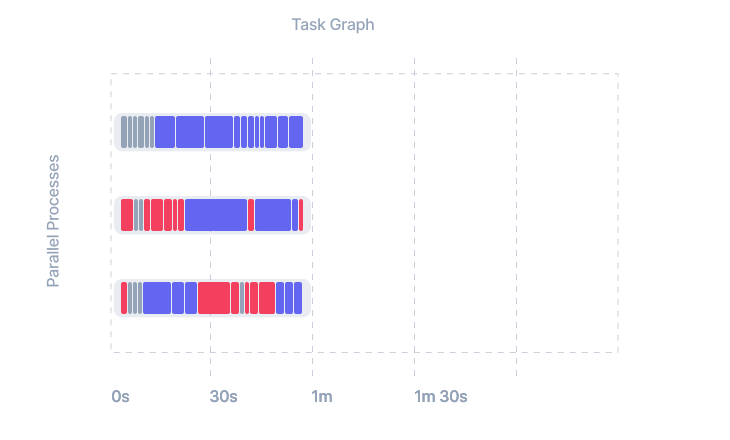
Section titled “Why task-based CI costs less”Most CI setups use static partitioning (binning and sharding), assigning work to machines up front, such as one job for tests and another for builds, and each machine runs until its slowest task ends.
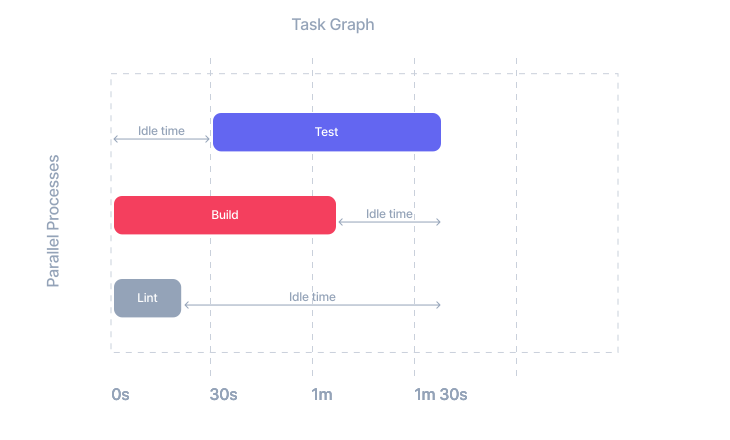
Nx Cloud assigns individual tasks as agents free up, using the task graph and each task's past duration, CPU, and memory use. Agents stay busy, an agent that fails during setup has its work picked up by the others, and adding agents needs no change to how work is split.
Learn how teams use Nx Cloud to scale their workspaces.
Nx Cloud features
Section titled “Nx Cloud features”AI-Powered Self-Healing CI
Learn how Nx Cloud Self-Healing CI uses AI to automatically detect, analyze, and fix CI failures, eliminating the need to babysit PRs and keeping you focused on building features.
Remote caching
Share cached task results across developer machines and CI with Nx Cloud remote caching, and hash each task from the files it reads with Ultracache, so CI skips work that already ran and costs less.
Distribute task execution (workers)
Nx Cloud workers distribute CI tasks across machines, and dynamic task packing fills each machine by CPU and memory use, so pull requests finish faster on fewer machine-minutes.
Run Only Tasks Affected by a PR
Run only the tasks a pull request affects with nx affected, which selects each task whose inputs your change touches and skips the rest.
Related guides
Section titled “Related guides”Frequently asked questions
Section titled “Frequently asked questions”Is Nx Cloud free?
Section titled “Is Nx Cloud free?”Yes. Nx Cloud starts on the free Hobby plan, which includes 50,000 credits per month, 5 contributors, and 10 concurrent CI connections, with no credit card.
Nx itself is free and open source too. Task running, the project graph, local caching, nx affected, generators, and migrations all work without an Nx Cloud account.
What happens when I use up my credits?
Section titled “What happens when I use up my credits?”On the Hobby plan, Nx Cloud features turn off once the monthly credits are gone and turn back on at the next reset.
The Team plan has no such cap, and usage beyond the $29 of included credit is billed at $5.50 per 10,000 credits. See credit pricing for what each operation costs.
Is Nx Cloud cheaper than running CI on GitHub Actions alone?
Section titled “Is Nx Cloud cheaper than running CI on GitHub Actions alone?”With 70% of task time served from cache, pipeline times roughly halve and GitHub spend drops 15% to 40%, depending on how many machine-minutes the pipeline uses today. See GitHub Actions pricing and how to cut your CI bill for the rate tables and the break-even math.
Do unused credits carry over?
Section titled “Do unused credits carry over?”No. Your allowance resets at the start of each billing cycle.
Is there a plan for open source projects?
Section titled “Is there a plan for open source projects?”Yes. Nx Cloud is free for qualifying open source organizations. Talk to our engineering team to get set up.
Can I get a shared cache without Nx Cloud?
Section titled “Can I get a shared cache without Nx Cloud?”Yes. Build your own server against the remote cache OpenAPI specification, in any language. You maintain the storage, authentication, and uptime.
When should I consider Enterprise or self-hosted options?
Section titled “When should I consider Enterprise or self-hosted options?”The Enterprise plan adds SSO and SAML, dedicated support with SLAs, conformance rules, code owners, and cross-repo visibility.
On a single-tenant instance or an on-prem install, you choose the region and the infrastructure your cache and run data live on. For what a standard Nx Cloud workspace sends and stores, see the privacy policy.