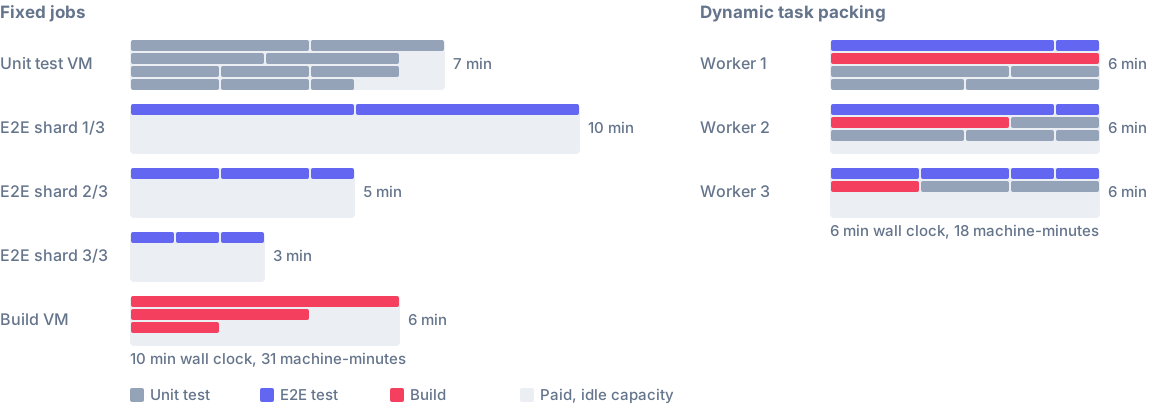
Run distributed tasks on the main CI job
The main CI job can now run distributed tasks alongside your Nx Cloud workers, on any CI provider. Turn it on in .nx/ci-config.yaml and declare how much CPU and memory the worker can use:
dte:
  distribute-on: 3 linux-large-js
  main-job-worker:
    cpu: 4
    memory: 12GiB
You don't need a new command: your existing nx-cloud start-workers step starts the worker. Assignment rules target it with agent: main.
View task artifacts in the browser
The run task page and the timeline drawer have a new Artifacts tab. It lists the files in a task's artifacts and previews screenshots, Playwright and Cypress videos, logs and static HTML reports, so you don't have to download and unpack the .tar.gz first (the download is still there). The tab is rolling out gradually.

Sign in from the CLI
nx login now signs you in through your browser. You don't need to create a personal access token and paste it into the terminal anymore, though the tokens you already use keep working. It's live on the multi-tenant North America and EU instances, and single-tenant and on-prem instances get it with their next upgrade.
Fix your version control connection from settings
When a repository is renamed or the GitHub App is reinstalled, organization admins can now repair the workspace's connection from its version control settings, without contacting support:
- Reconnect finds the workspace's current GitHub repository and updates the connection in one click.
- Change repository points a GitHub App workspace at another repository.
- Check connection runs the check right away. Otherwise Nx Cloud only re-checks when someone opens these settings and the last check is more than two hours old.
- GitLab, Bitbucket and Azure DevOps workspaces show a live connection status, like GitHub workspaces do.
- When a broken connection stops CI, the CLI and the pipeline page say what broke and who can fix it.
Ultracache config history
From a task's Ultracache tab, open Config history to see the task's config across the commits Nx Cloud used to choose its inputs. A config that is wrong, or that changes on every commit when it should have settled, is easy to spot. Workspace admins can unset a bad config from the same page. While recent uploads are still processing, the tab says so, because the history can be incomplete until they finish.

More updates
- Nx Cloud now announces new features and major changes in the app when you sign in. Past announcements are listed on the What's new page.
- The sign-in page marks the method you used last time, such as Google or GitHub, as Last used. It appears after your next sign-in, since earlier choices weren't recorded.
- Set
NX_CLOUD_ULTRACACHE_MODEtoON,WARN,ERRORorOFFto override Ultracache for one CI pipeline without changing workspace settings. - A worker starts a task's continuous dependencies, such as dev servers, only when it starts that task, and keeps them running through short gaps between tasks. Before, servers that bind the same port could run at once, or stop before the tasks that needed them, so e2e tests reached the wrong app or failed to connect.
nx-cloud start-ci-run --no-distributionignores.nx/ci-config.yaml, so a job can register a CI pipeline execution without starting workers.- Public API: timestamp filters accept a bare date such as
2026-10-26, which covers the whole UTC day. The run-group steps list filters by step name with?name=. Agents are now workers: use/run-groups/{id}/workersand theworkerCount,workerNameandworkersfields. The/agentspaths and agent-named fields still work but are deprecated. - Idle workers stop as soon as a distributed execution finishes. Before, they waited up to a minute for the CI pipeline to complete.
- Connecting a GitHub repository to a workspace now checks that you're an admin of the repository. If your Nx Cloud organization is connected to a GitHub organization, the repository must belong to it.
- We extended the product tour to cover the pipeline's Timeline and Resource usage views.