Micro frontend (also written microfrontend or MFE) architecture splits a web application's frontend into smaller applications that separate teams develop, test, and deploy independently. Each micro frontend owns a vertical slice of the product, such as checkout or search, and the pieces compose in the browser at runtime. The pattern trades a single coordinated release for independent release cadences per team.
A common way to implement micro frontends in JavaScript is Module Federation. The sections below build a working setup with the @module-federation/vite plugin, not just architecture diagrams.
When should you use micro frontends?
Section titled “When should you use micro frontends?”Use micro frontends when independent deployment is a hard requirement: several teams ship to the same application, and waiting on a shared release train costs more than the added architectural complexity. If your teams can deploy together and you mainly want faster builds, runtime composition is the wrong tool for that problem.
When should you avoid micro frontends?
Section titled “When should you avoid micro frontends?”Avoid micro frontends in the following situations:
- A single team owns the whole frontend. Independent deployment solves a team-coordination problem you don't have.
- Your teams already deploy together. Federation adds runtime failure modes without removing any release bottleneck.
- The application is small. Module boundaries inside one deployable give you code ownership without version skew.
- You can't fund the ongoing coordination work: shared dependency contracts, cross-app integration testing, and rollback procedures for non-atomic releases.
Micro frontend benefits and tradeoffs
Section titled “Micro frontend benefits and tradeoffs”Micro frontends buy team autonomy and independent releases, and they charge for it in runtime overhead and coordination complexity.
| Benefit | Tradeoff |
|---|---|
| Each team deploys on its own cadence | Releases are not atomic, so app versions can skew between deployments |
| Teams own their slice end to end | Cross-team contracts move from compile-time checks to runtime agreements |
| Each team builds and ships a smaller application | Shared dependencies duplicate in the bundle unless you federate them |
| A broken deploy is scoped to one micro frontend | Integration bugs only surface when specific app versions meet in production |
Micro frontends with Module Federation
Section titled “Micro frontends with Module Federation”Module Federation lets one application load modules that another application exposes at runtime, while dependencies you mark as shared, such as react, can load once as singletons. Nx uses two roles for this: a consumer loads federated components, and a provider exposes them. As of Nx v23, the host and remote generators are replaced by consumer and provider. For the full generator surface and migration steps, see consumer and provider. For the React-specific setup path, see Micro Frontends with React.
The applications stay independent in the project graph. A shell consumer with three providers, about, cart, and shop, plus a shared ui-button library looks like this:
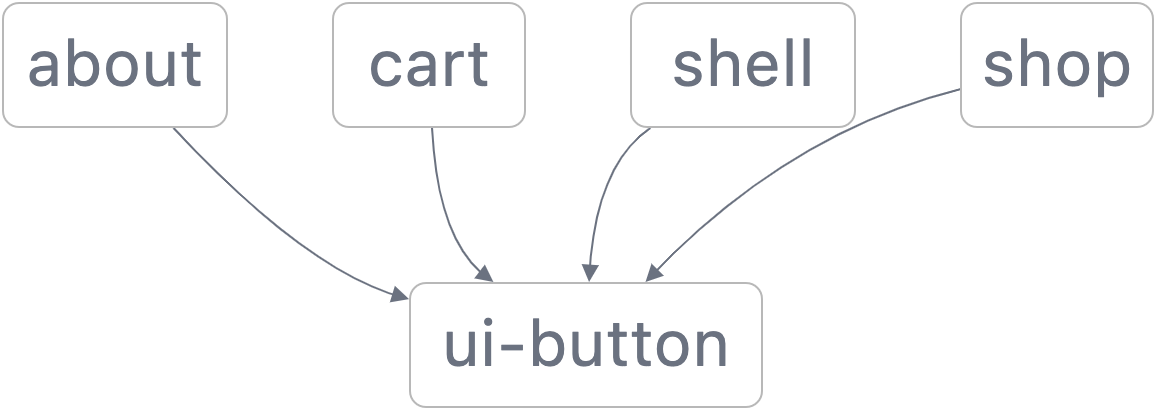
There are no dependencies between the applications themselves, only on shared libraries, which is what lets each one deploy independently.
Generate a consumer and providers
Section titled “Generate a consumer and providers”nx g @nx/react:consumer apps/shell --bundler=vite --providerNames=shop,cartnx g @nx/react:provider apps/about --bundler=vite --consumer=shellThe consumer registers providers at runtime through the PROVIDERS list in its src/mf.ts, so adding the standalone about provider is an edit to that list, not a rebuild of every app. Run nx serve shop to develop a provider. Its serve target depends on the consumer's serve target, so the shell comes up alongside it. The --consumer flag wires up the same behavior for providers generated on their own, like about above.
Share as few libraries as possible
Section titled “Share as few libraries as possible”Because deployments are not atomic, mismatched shared library versions are a leading failure mode of micro frontends. The safest strategy is to share only the libraries that must be singletons, such as your UI framework and any cross-app communication layer, and let everything else stay bundled per app:
import { federation } from '@module-federation/vite';import react from '@vitejs/plugin-react';import { defineConfig } from 'vite';
export default defineConfig(() => ({  plugins: [    federation({      name: 'about',      filename: 'remoteEntry.js',      exposes: {        './App': './src/App.tsx',      },      // Share only libraries that must load once at runtime.      // Everything else stays bundled per application.      shared: {        react: { singleton: true },        'react-dom': { singleton: true },        '@acme/pub-sub': { singleton: true },      },    }),    react(),  ],}));
Not sharing a library means each app bundles its own copy, which increases download size. Start with a small set of singletons and expand it when duplication becomes measurable. For a complete walkthrough of this plugin setup, see Vite Module Federation. A worked reference workspace covering Vite, Rsbuild, and Rspack lives in the mf-examples repository.
Why build micro frontends in a monorepo?
Section titled “Why build micro frontends in a monorepo?”A monorepo removes two of the biggest micro frontend pains: shared dependency drift and cross-app integration testing. Every application builds against the same library versions at the same commit, and CI exercises the composed application before any team deploys. Deployments stay independent even though the repository is shared.
- Run affected tasks to test and deploy only the applications a change touches.
- Use module boundary rules to keep each team's slice from reaching into another team's internals.
How do you deploy micro frontends?
Section titled “How do you deploy micro frontends?”Teams deploy micro frontends in one of two ways, and many mix them: a la carte deployments, where each application follows its own release cadence, and affected deployments, where CI automatically tests and deploys only the applications a merge touches.
A common mix is automatic deployment to staging on every merge, with promotion to production on a set schedule such as weekly releases. Agree on a process for changes to shared core libraries: those changes affect every application, so they block other releases and should ship infrequently.
Fully automated production deployment also works, but it needs end-to-end tests you trust and a rollback mechanism for bad deploys. As the number of applications grows, distribute those CI runs with Workers to keep pipeline times flat.
Micro frontends with Angular
Section titled “Micro frontends with Angular”Nx v24 removed the @nx/angular host and remote generators. For Angular micro frontends, look to @angular-architects/native-federation, which implements the same runtime composition model on top of the Angular CLI build. Nx still runs, caches, and orchestrates the Angular apps as regular projects in the workspace. To move an existing Nx Module Federation setup, see migrate Angular Module Federation.
Strategic collaboration over micro frontend anarchy
Section titled “Strategic collaboration over micro frontend anarchy”Micro frontend anarchy is a setup that mixes competing technologies, such as Angular in some applications and React in others. Module Federation makes this possible, but every extra framework multiplies the shared dependency surface and splits your developers into camps that can't review each other's code.
Agree on one set of adopted technologies per concern: UI framework, styling approach, and state management. Mixing competing technologies makes sense only as a deliberate transition strategy, such as an incremental migration from one framework to another.