Rebuilding and retesting the same code repeatedly is costly. Nx offers a sophisticated and battle-tested computation caching system that ensures code is never rebuilt twice. This:
- drastically speeds up your task execution times while developing locally and even more in CI
- saves you money on CI/CD costs by reducing the number of tasks that need to be executed
Nx restores both the terminal output and the files created from running the task (e.g., your build or dist directory).
How caching works
Section titled “How caching works”Before running a cacheable task, Nx calculates a hash from the task's inputs. Two runs with the same hash represent the same computation, so Nx can reuse the earlier result. A task hash can include:
- Project source files and files from project dependencies.
- Relevant workspace configuration.
- Versions of external dependencies.
- Runtime values, such as the operating system and CPU architecture.
- Command-line arguments passed to the task.
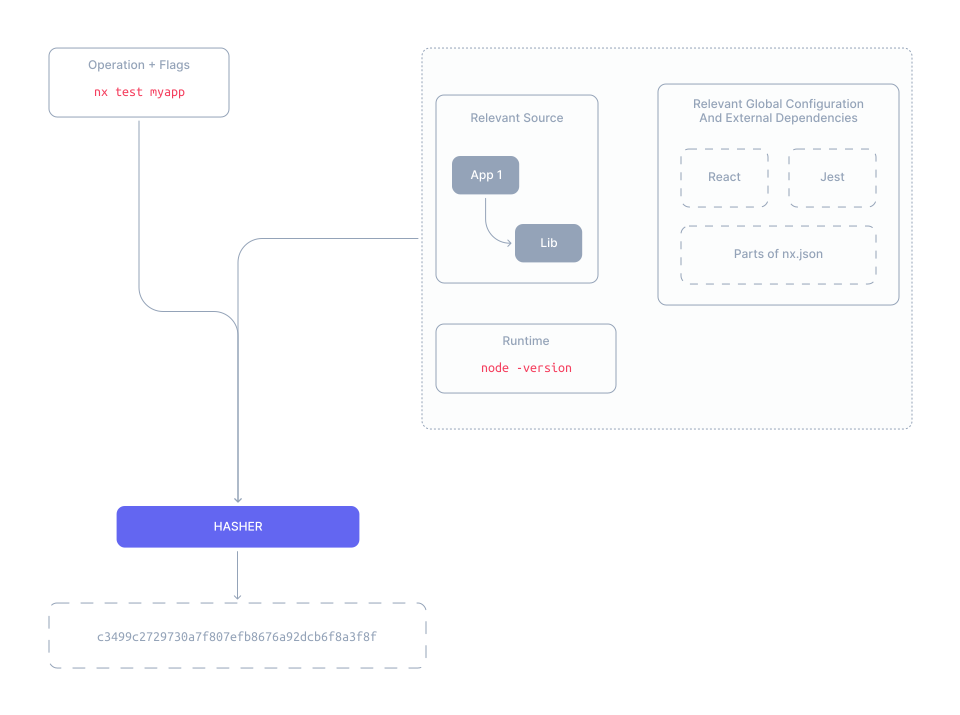
Nx checks the local cache for the hash, then the remote cache when one is configured. On a cache hit, Nx restores the cached output files and prints the stored terminal output. On a cache miss, Nx runs the task and stores the result locally, and in the remote cache when the current authentication settings permit writes.
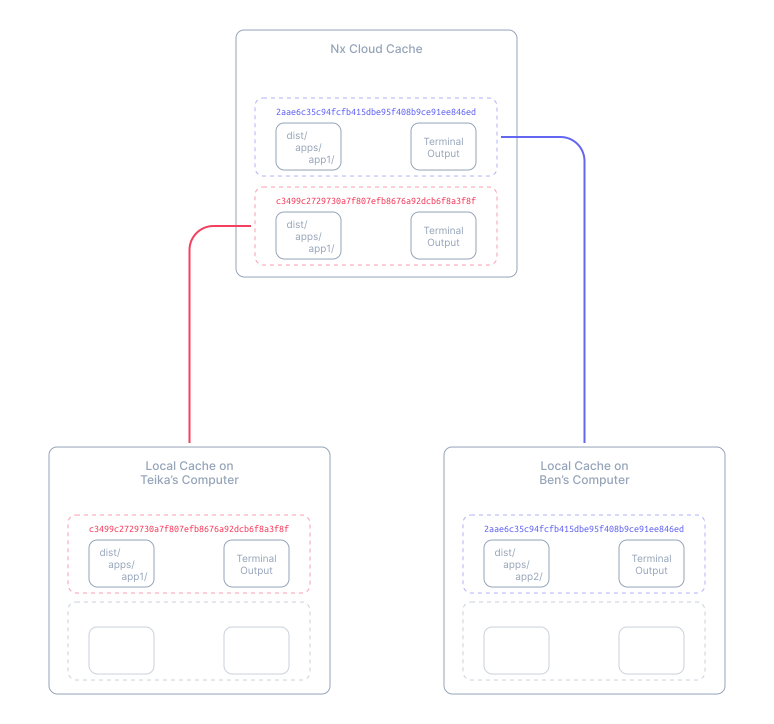
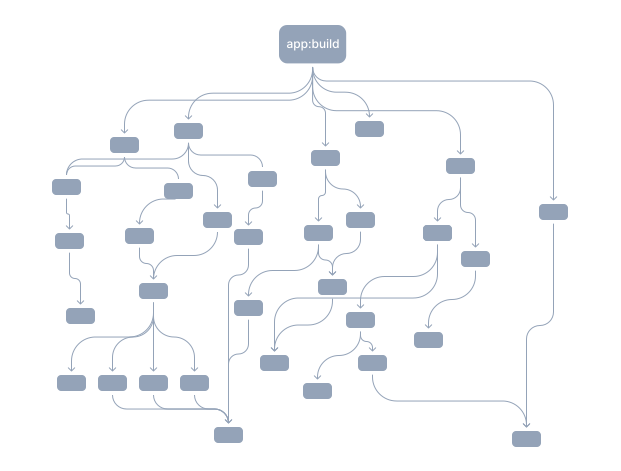
Nx hashes each task in the task graph separately, so some tasks can be cache hits while others run. Commands that create the same task with the same arguments produce the same hash: nx build myapp and nx run-many -t build -p myapp share a cache entry, while nx build myapp --sourcemap doesn't.
What Nx caches
Section titled “What Nx caches”Nx caches task results at the process level, whatever tool the task runs. A cache entry contains:
- Terminal output written to standard output and standard error.
- Files and directories matched by the target's
outputs. - The task hash that identifies the entry.
Source files and other inputs aren't stored, only their hashes. To change what a task hashes or stores, see configure inputs and outputs.
Define cacheable tasks
Section titled “Define cacheable tasks”To enable caching for build and test, edit the targetDefaults property in nx.json to include entries for the build and test tasks:
{ "targetDefaults": { "build": { "cache": true }, "test": { "cache": true } }}Configure inputs and outputs
Section titled “Configure inputs and outputs”Inputs are what Nx hashes, such as files and environment variables. Outputs are the files Nx caches and restores.
Define inputs and outputs per project in project.json or package.json, and share them across projects with targetDefaults in nx.json. Nx plugins infer inputs and outputs from your existing configuration, such as vite.config.ts, so you don't have to redefine them.
This example keeps Markdown edits from invalidating build and stores the build output in dist/<project-name> at the workspace root:
{ "targetDefaults": { "build": { "inputs": ["{projectRoot}/**/*", "!{projectRoot}/**/*.md"], "outputs": ["{workspaceRoot}/dist/{projectName}"] } }}{ "name": "some-project", "targets": { "build": { ... "inputs": ["!{projectRoot}/**/*.md"], "outputs": ["{workspaceRoot}/dist/apps/some-project"], ... } ... }}{ "name": "some-project", "nx": { "targets": { "build": { ... "inputs": ["!{projectRoot}/**/*.md"], "outputs": ["{workspaceRoot}/dist/apps/some-project"], ... } ... } }}Learn more about configuring inputs including namedInputs.
Configure caching automatically with Ultracache
Section titled “Configure caching automatically with Ultracache”On Nx Cloud, Ultracache traces the files a task reads when it runs on Workers. Later CI runs hash the task from those files in place of its declared file inputs, so a change to a file the task never reads no longer causes a cache miss.
Ultracache requires Nx 24.0.0 or later. To set it up, connect your workspace to Nx Cloud, turn on Ultracache, and distribute tasks on Workers.
Troubleshoot cache settings
Section titled “Troubleshoot cache settings”Caching is hard. If you run into issues, check out the following resources: