Requirements
Section titled “Requirements”The @angular-rspack/nx plugin supports the following package versions.
| Package | Supported Versions |
|---|---|
@rspack/core | ^2.0.0 || >=1.3.5 <1.7.0 |
@angular/core | See Angular version matrix |
Nx generators install the latest supported versions automatically when scaffolding new projects.
Angular compilation has always been a black box hidden behind layers of abstraction and configuration, exposed via the Angular Builders from the Angular CLI packages.
Originally, the underlying tool that bundled the Angular application was Webpack. This was great as teams were able to extend their builds by leveraging the vast Webpack ecosystem and plugins that are available.
Over time, it became clear that the inherit slowness with Webpack build speeds was becoming more and more of an issue for Angular developers.
The Angular Team decided to address this build speed issue by building out a new build pipeline that used Esbuild.
This succeeded in reducing the build times for Angular applications, however, it made one crucial mistake. It left the existing Angular applications that relied on the Webpack ecosystem behind, with either a difficult migration path or none at all.
Rspack
Section titled “Rspack”The solution to this problem was to create a new build pipeline that could use the existing Webpack ecosystem and plugins while also providing faster builds for Angular applications.
This is where Rspack come into play.
Rspack is a high performance JavaScript bundler written in Rust. It offers strong compatibility with the Webpack ecosystem, and can serve as a near drop-in replacement for webpack with significantly faster build speeds.
Because it supports the existing Webpack ecosystem, it provides an answer to teams that maintain Angular applications using Webpack and want to migrate to a faster build pipeline.
This makes it a great solution for teams that want to migrate to a faster build pipeline, but still want the ability to extend their builds and use Module Federation.
Known limitations and missing features
Section titled “Known limitations and missing features”The following are known limitations and missing features of Angular Rspack:
- The
staticoutput mode (build-time prerendering of the full application) is not supported. RenderMode.Prerenderdoes not produce build-time output. Routes marked with it render at request time, repeating the full render on each request. Response streaming does not apply. WheninlineCriticalCssis enabled, each request also repeats the critical CSS inlining. Theprerenderbuild option does render at build time. Use it to list the routes to prerender.- The server route configuration is extracted at runtime, not at build time. Each server process extracts it while handling its first application request. Route configuration errors therefore surface on that request.
- Automatic content security policy generation (
security.autoCsp) is not supported. - Locale inlining (
localize) disables the@angular/ssrapplication engine wiring. Server entries that rely on the engine wiring fail at startup. TheoutputModeoption cannot be combined with it. - With
@rspack/corebefore 1.5, the engine manifests are registered inside the server entry. They run before the entry's own statements, but after its imports. An engine constructed at module scope of an imported module does not find them.
If you have any other missing features or limitations, please let us know.
Benchmarks
Section titled “Benchmarks” 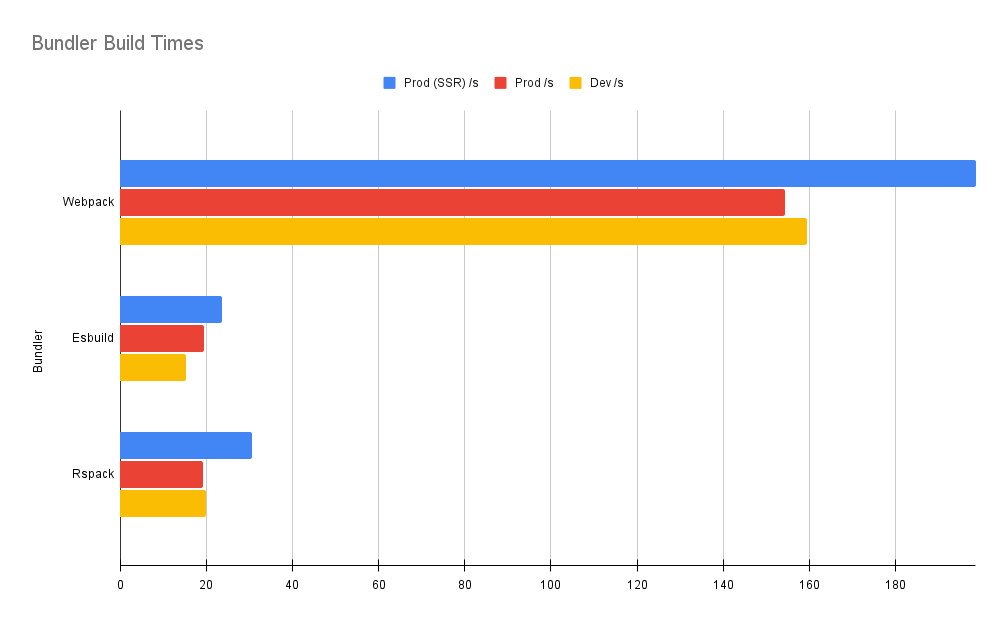
Below is a table of benchmarks for different bundlers, tested on an application with ~800 lazy-loaded routes and ~10 components per route—totaling ~8000 components.
System Info
- MacBook Pro (macOS 15.3.1)
- Processor: M2 Max
- Memory: 96 GB
| Build/Bundler | Prod SSR (s) | Prod (s) | Dev (s) |
|---|---|---|---|
| Webpack | 198.614 | 154.339 | 159.436 |
| esbuild | 23.701 | 19.569 | 15.358 |
| Rspack | 30.589 | 19.269 | 19.940 |
You can find the benchmarks and run them yourself: https://github.com/nrwl/ng-bundler-benchmark
Set up CI
Section titled “Set up CI”In CI, Nx runs nx affected to rebuild and retest only the projects a change touches, and caches results to skip repeated work.
For a complete pipeline, see Set up CI.