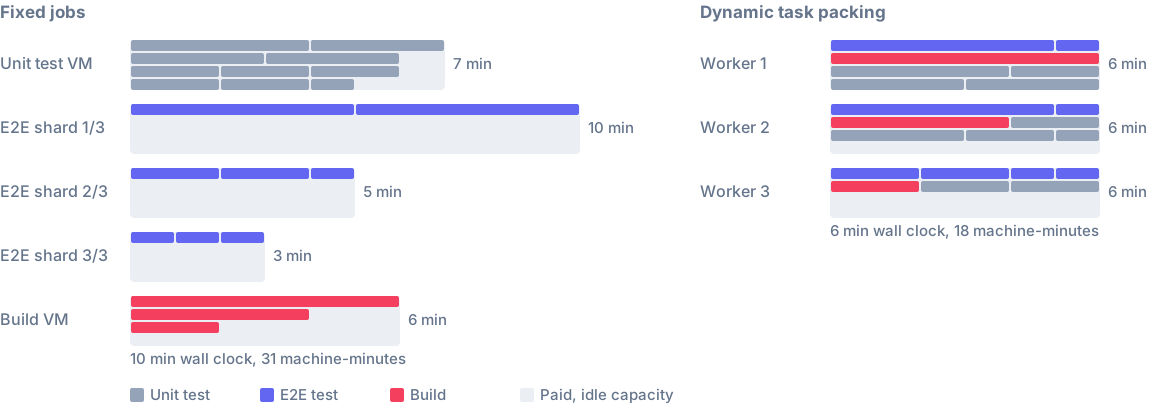
Nx Cloud CI runs your whole pipeline on Nx Cloud workers: checkout, install, Nx tasks and the steps around them. You no longer need a separate CI provider to start the workers that run your tasks.
Nx Cloud CI is in private beta. Sign up on the Nx Cloud CI page to get an invite link that creates an organization on Nx Cloud CI. Existing organizations keep using Nx Cloud with external CI as they do today.
Define pipelines in .nx/pipelines
Each .yaml file in .nx/pipelines with an on section defines a pipeline: its jobs, their steps and the workers that run their Nx tasks. This one runs affected tasks on every pull request and every push to main, spread across three workers:
# .nx/pipelines/ci.yaml
# yaml-language-server: $schema=https://cloud.nx.app/nx-cloud/static/schemas/workflow.schema.json
name: CI

on:
  pull-requests:
    event: PR
  main-pushes:
    event: PUSH
    branches: [main]

jobs:
  main:
    runs-on: linux-medium-js
    workers: 3 linux-medium-js
    steps:
      - name: Run affected tasks
        run: npx nx affected -t lint test build e2e-ci
runs-on is the machine that runs the job's steps. It checks out your repository and installs dependencies before the first step. workers are the machines that nx affected distributes the job's tasks to. Nx Cloud starts them with the job, so there is no start-workers step to add. Both name a launch template; linux-medium-js is one of the templates Nx Cloud provides. Your current CI workflow keeps running next to Nx Cloud CI until you remove it.
Before anything runs, Nx Cloud validates each file. A mistake fails the pipeline with a <file> / configuration check on GitHub that names the file, the job and the field. The yaml-language-server comment points your editor at the same schema, for completion and hover docs.
Jobs that depend on each other
A job lists the jobs it waits for in needs. It starts once they all succeed and is skipped when one of them fails. if: always() runs it either way, and ${{ needs.<job>.result }} reads success, failure, cancelled or skipped, so a final job can act on the outcome of the others:
jobs:
  checks:
    runs-on: linux-medium-js
    steps:
      - run: npx nx format:check
  main:
    # ...
  gate:
    runs-on: linux-medium-js
    needs: [checks, main]
    if: always()
    steps:
      - run: |
          [[ "${{ needs.checks.result }}" == "success" ]] || exit 1
          [[ "${{ needs.main.result }}" == "success" ]] || exit 1
Size the workers to the change
Give a job small, medium and large worker counts instead of one number:
jobs:
  main:
    runs-on: linux-medium-js
    workers:
      small: 2 linux-medium-js
      medium: 5 linux-medium-js
      large: 10 linux-medium-js
    steps:
      - run: npx nx affected -t lint test build e2e-ci
Nx Cloud estimates how much of the workspace's work is left after cache hits, from stored task timings: the remaining tasks against every task in the workspace. Up to a third picks small, up to two thirds medium, more than that large. The job starts with the small count. Each time a command in the job distributes Nx tasks, Nx Cloud works out the share again and adds the workers the new size needs. It never removes workers.
Two more keys go in the same workers block. workload moves a boundary, and main-job-worker runs tasks on the job's own machine as well:
workers:
  small: { count: 2 linux-medium-js, workload: 10% }
  medium: 5 linux-medium-js
  large: 10 linux-medium-js
  main-job-worker: { cpu: 3, memory: 6GB }
To share one setup between jobs, define it under a top-level worker-templates key and set workers: <name> on each job. The same key is what nx-cloud start-workers reads on an external CI provider, so one file serves both. The CI configuration reference lists every key.
One page per pipeline
A pipeline's Overview shows each job's steps as a graph or a list, with their logs, Nx runs and workers. A step that runs Nx tasks charts how many of them ran at once.

GitHub gets one status per workflow file, named Nx Cloud: <workflow name>, that links to this page. When a single job fails, the status names it and links to that job.
Cancel a pipeline from its page, or re-run the whole pipeline at the same commit. A new push to a pull request cancels the run still going for the older commit.
Secrets and environment variables
Variables for your jobs live on the Environment variables page in workspace settings, encrypted at rest. Each variable has a scope, and CI pipelines is the one Nx Cloud CI jobs read. A variable marked secret is masked in step logs. A stored variable only reaches a job where an env maps it, with ${{ secrets.<NAME> }} for secrets and ${{ vars.<NAME> }} for the rest:
env:
  NODE_OPTIONS: --max-old-space-size=8192
  NPM_TOKEN: ${{ secrets.NPM_TOKEN }}
env at the top of the file or on a job also reaches the workers of that job.
Pull requests from forks
Pull requests from forks run with no workspace variables, a read-only Nx Cloud token and no self-healing Fix CI step. When GitHub lists the author as none of owner, member, collaborator or contributor of the repository, each push waits for a workspace member to approve it on the pipeline page. GitHub shows "Waiting for approval in Nx Cloud" in the meantime.
Raise the concurrent worker limit
Each organization has one limit on concurrent workers, starting at 25, shared by its Nx Cloud CI and external CI runs. On the Team plan you can raise it to 50, 75 or 100 workers from your organization settings.

Runs that need more workers than are free wait in a queue. The Usage page shows workers in use against the limit, and how many are waiting.