Nx caches task results locally so the same machine doesn't repeat a task with the same inputs. Remote caching shares those results across developer machines and CI jobs.
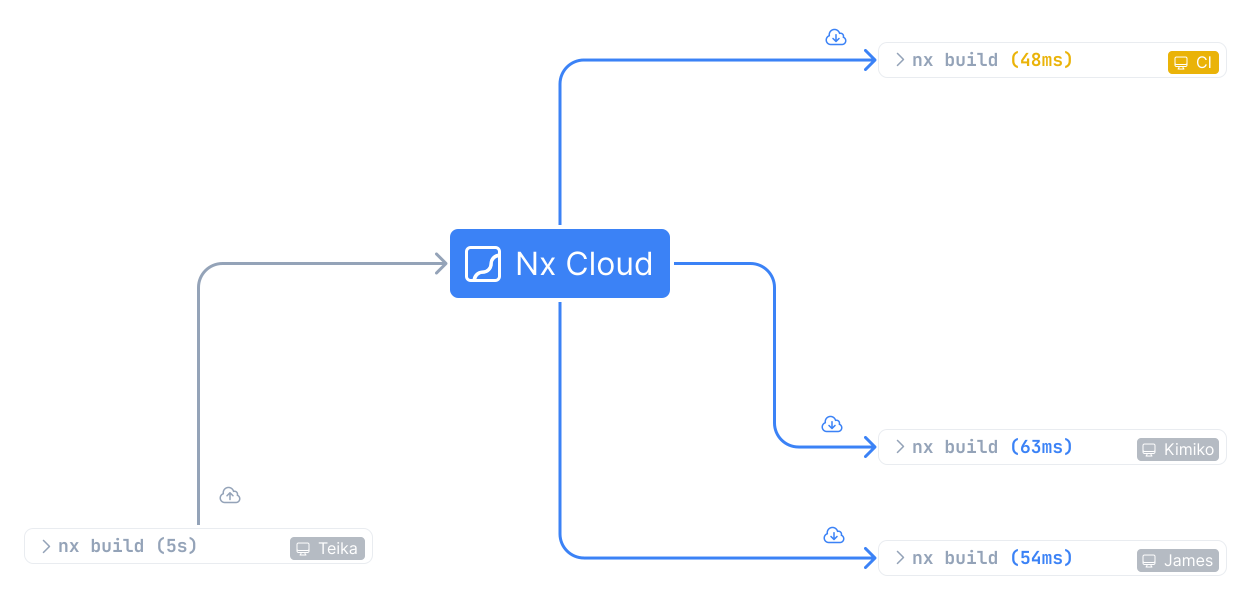
On a remote cache hit, Nx restores the terminal output and declared task artifacts, such as a build or distribution directory. The command behaves like a local cache hit without running the task again.
Every cache hit is a task your CI machines don't run, so remote caching shortens pipelines and cuts machine-minutes, which reduces cost.
Configure remote caching
Section titled “Configure remote caching”Connect your workspace to Nx Cloud:
npx nx@latest connectConnect from your browserSign in to Nx Cloud and connect your repository without the CLI
For authentication and CI setup details, see Setting Up CI.
Why use remote caching
Section titled “Why use remote caching”Remote caching can reduce work in several places:
- Repeated CI runs can reuse tasks that already ran with the same inputs.
- Developers can reuse results created in CI when their cache permissions grant access.
- CI jobs and Workers can transfer task artifacts through the shared cache.
nx affected runs only the tasks your change reaches. The tasks they depend on run too, and those restore from the cache when nothing in them changed. When you push to the same pull request again, nx affected selects the same tasks, and the ones your new commit doesn't reach are cache hits.
Workers use remote caching to share artifacts between machines. When a task depends on output produced by another agent, Nx restores that output before running the dependent task.
What Nx Cloud stores
Section titled “What Nx Cloud stores”Each cached task result contains:
- Terminal output written to standard output and standard error.
- Files matched by the task's
outputsconfiguration. - The hash that identifies the task computation.
The cache entry doesn't contain the input source files. Nx hashes those inputs to calculate the task hash. For more information, see what Nx caches.
A task's inputs decide whether it hits or misses the cache, and its outputs decide which files are restored on a hit. To see which tasks read or write files outside them, open Analytics > Cache inputs and outputs in Nx Cloud, and open a task's Report tab for the files each process read and wrote. Improve cache inputs and outputs walks through fixing them with a coding agent, and on Nx Cloud, Ultracache handles most of them for you.
Ultracache
Section titled “Ultracache”Ultracache improves cache hit rates and keeps file inputs correct without requiring you to maintain complex configuration. It gives you several benefits:
- Faster CI and lower compute costs. Changing a file a task never reads no longer invalidates its cache. Fewer unnecessary cache misses mean fewer tasks to run, which can substantially reduce CI compute (up to 3× in some cases).
- Correct cache invalidation. By default, Ultracache tracks every file a task reads, preventing stale cache hits from missing input declarations.
- No input configuration maintenance. Ultracache records file inputs for new targets automatically and keeps them up to date as your tasks change. You don't need to maintain file lists by hand.
- Increased extensibility. Ultracache automatically configures file inputs for scripts you run through Nx. Any new technology you add gets the same automatic configuration, without needing an Nx plugin.
Manually configured inputs and inputs inferred by plugins can include files a task doesn't need, causing unnecessary cache misses, or omit files it does need, causing stale cache hits. Ultracache records the task's actual file reads instead of requiring you to keep that list precise as the task changes.
Ultracache is part of every Nx Cloud plan, including Hobby, and traced tasks don't use credits.
How Ultracache works
Section titled “How Ultracache works”The first time a task runs on Workers, Nx hashes it from its declared inputs and records the files it reads. Later CI runs hash the task from that recording, and the recording grows when the task reads a file it didn't read before. It lives in Nx Cloud, so your configuration files don't change, and declared outputs still decide what Nx caches.
Only runs on Workers are recorded, but every CI run hashes from the recording, including on CI machines you manage yourself. Runs outside CI hash from declared inputs. Cache hits, continuous tasks, tasks with cache: false, and tasks run by a batch executor aren't traced.
Turn on Ultracache
Section titled “Turn on Ultracache”New Nx Cloud workspaces start with Ultracache on. For an existing workspace, open the workspace's Settings page in Nx Cloud and set Ultracache to On.
Ultracache requires Nx 24.0.0 or later, which uses it in CI by default. For Nx 23 and runs outside CI, see Ultracache and Nx versions.
To skip Ultracache for a single run, set NX_CLOUD_USE_ULTRACACHE to false.
Turn off Ultracache for a target
Section titled “Turn off Ultracache for a target”Every target uses Ultracache by default. Set ultracache.mode to off to hash a target from its declared inputs instead. This also turns off tracing for the target, so its reads and writes no longer appear under Analytics > Cache inputs and outputs:
{ "targets": { "e2e": { "ultracache": { "mode": "off" } } }}To keep Ultracache on but leave paths such as a tool's scratch directory out of a target's recording, list them in ultracache.ignoreReads and ultracache.ignoreWrites. For every mode and option, see the ultracache target property.
Ultracache and affected
Section titled “Ultracache and affected”nx affected uses task inputs to determine which tasks a change affects and need to run. For tasks with an Ultracache recording, those inputs come from the files the task actually reads. This makes nx affected more efficient and accurate: unused files no longer select tasks unnecessarily, and files missing from declared inputs no longer cause affected tasks to be overlooked.
Remote cache security
Section titled “Remote cache security”A cache hit replays files and terminal output without running the task, so the main risk is cache poisoning: a tampered entry that developers and CI then use as real task output. Nx Cloud guards against it in several ways:
- Your source code never reaches the cache. Nx Cloud stores the task hash, the files matched by
outputs, and the terminal output. - Cache entries are immutable. Once Nx Cloud stores an entry, no later run can overwrite it.
- CI writes are scoped by token. Use a read-write token only on protected branches, such as
main. On other branches, a read-only token reads the shared cache and writes to a cache isolated to that run, so a pull request can't change whatmainrestores. - Nx Cloud protects against CREEP (CVE-2025-36852), where an untrusted pull request writes a poisoned artifact that a trusted build later restores. With the token setup above, pull request writes stay isolated from the cache used by protected branches.
- Developers authenticate with personal access tokens. Workspace settings decide whether each developer can write to the cache, and whether unauthenticated machines get read-write, read-only, or no access.
- End-to-end encryption encrypts artifacts on your machines before they're uploaded, with a key Nx Cloud never sees.
To keep a poisoned entry from ever reaching your users, skip the cache when you build the artifact you deploy. For the full list of precautions, see cache security. Nx publishes compliance information, including SOC 2, on the Nx security site.
Remote cache availability
Section titled “Remote cache availability”Nx checks the local cache before requesting a result from the remote cache. If the remote cache is unavailable, local cache hits remain available, and Nx runs tasks that aren't cached locally.
Enterprise remote caching
Section titled “Enterprise remote caching”Organizations with specific data residency or infrastructure requirements can contact the Nx Enterprise team to discuss remote caching deployment options.
Skip remote caching
Section titled “Skip remote caching”Use --skipRemoteCache when one command shouldn't read from or write to the remote cache. For related local cache options, see skip task caching.