Nx coordinates work in your workspace through a few core concepts: the project graph, the task graph, caching, and inferred tasks. Plugins apply these concepts to the tools and frameworks in your repository.
The project graph
Section titled “The project graph”Take a workspace with a React frontend, a Java backend, and the packages they share:
Directoryapps/
Directoryweb/ React app, imports ui and utils
- …
Directoryapi/ Java service (Gradle), depends on core
- …
Directorypackages/
Directoryui/ React components
- …
Directoryutils/ TypeScript helpers
- …
Directorycore/ Java library
- …
Nx finds each project from its package.json or project.json file, or from a plugin that reads tool configuration, such as vite.config.ts for web or build.gradle.kts for api. It then reads TypeScript imports, package.json dependencies, and Gradle project dependencies to find how the projects connect. Both languages end up in one graph:
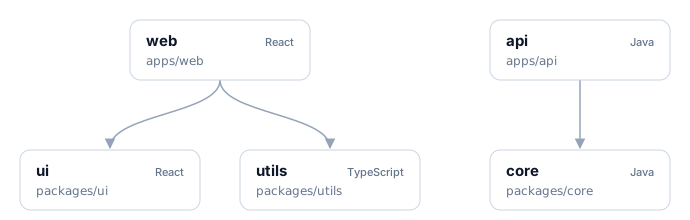
Nx updates the graph as you change code. Run nx graph to explore it in the browser.
The task graph
Section titled “The task graph”A task is a target run for one project, such as web:build. When you run a command, Nx combines the project graph with your task pipeline to build a task graph for that command. This pipeline says a project's build needs the build of every project it depends on:
{ "targetDefaults": { "build": { "dependsOn": ["^build"] } }}With that rule, nx build web creates this task graph:
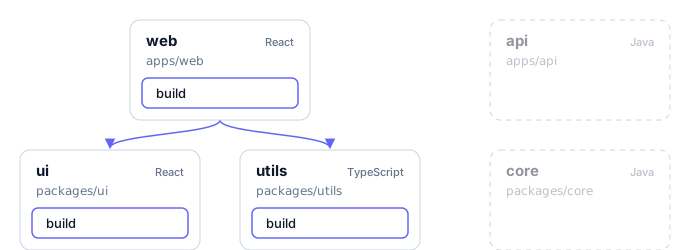
ui:build and utils:build don't depend on each other, so Nx runs them in parallel and starts web:build once both finish. api and core aren't in the task graph because nx build web doesn't need them.
Each command gets its own task graph. nx run-many -t build would add api:build and core:build, with core built first. nx test web follows whatever pipeline you set for test.
Caching
Section titled “Caching”Before running a task, Nx hashes its inputs: the project's source files, the files of the projects it depends on, configuration, and external dependency versions. If a task with the same hash ran before, Nx replays it from the cache, restoring both its terminal output and its files.
Say you edit a component in apps/web and run nx build web again. The inputs of ui:build and utils:build haven't changed. Both come from the cache, and only web:build runs:
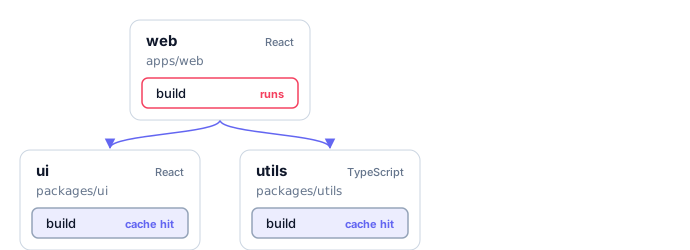
Remote caching shares one cache between CI machines and developers: a task that ran on one machine is a cache hit on the others.
Inferred and explicit configuration
Section titled “Inferred and explicit configuration”Plugins infer tasks from your tool configuration. For apps/web, the @nx/vite plugin sees vite.config.ts and creates build, dev, and preview tasks with the right command, cache inputs, and outputs. When you change the Vite config, the inferred tasks follow it.
Explicit tasks are the ones you write yourself, as package.json scripts or as targets in project.json or the nx section of package.json. Use them for tasks no plugin knows about, or to override what a plugin infers.
Nx merges the sources for each task, from lowest to highest precedence:
- Tasks inferred by plugins registered in
nx.json. targetDefaultsinnx.json.- The project's own
package.jsonorproject.json.
To see the resolved tasks for a project, and which file or plugin set each value, open the project details view:
nx show project web --webLearn more
Section titled “Learn more”- Run tasks: run tasks for one project, many projects, or only affected ones
- Cache task results: configure what Nx caches
- Explore the project graph: view and query the graph
- Project configuration reference: every task option