With Nx Cloud workers, the tasks in your CI run spread across several machines. Dynamic task packing keeps each machine close to its CPU and memory limits. You pay for machine-minutes, not for how busy a machine is, so the same work packed onto fewer, busier machines costs less and finishes sooner.
In most workspaces, that adds up to about 50% fewer machine-minutes than remote caching alone.
Why CI pipelines waste compute
Section titled “Why CI pipelines waste compute”Most pipelines use static partitioning (binning and sharding), splitting work into fixed jobs, such as one machine per task type, with e2e tests split into shards across more machines. Each machine still runs only the tasks assigned to it, so a shard that gets two long e2e tests holds up the whole run while the other machines finish early or sit mostly idle.
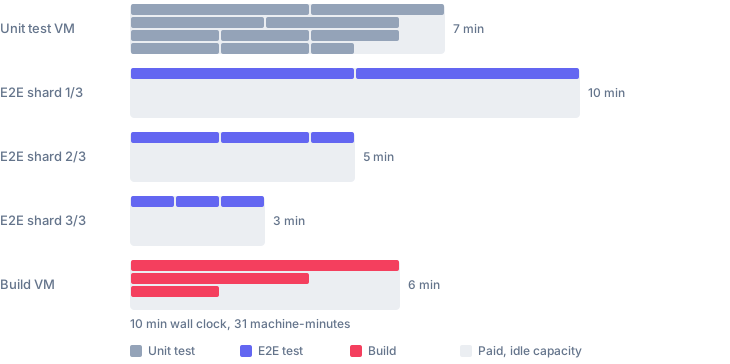
How dynamic task packing works
Section titled “How dynamic task packing works”Nx Cloud uses what it knows about your projects and tasks to decide which task runs where, and when:
- Task order and the critical path come from the task graph, so long chains start first.
- Each task's duration and its CPU and memory profile come from previous runs.
- Each worker gets new work whenever it has room for it, instead of a batch fixed at the start of the run.
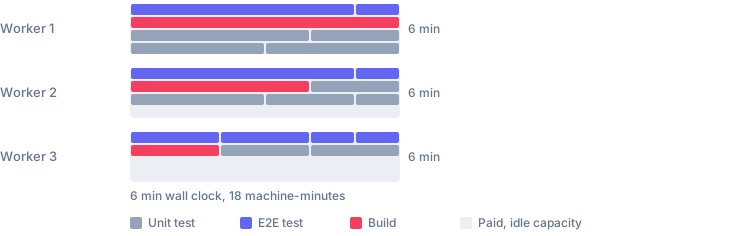
A lint task and a memory-heavy e2e test can share a worker because Nx Cloud knows they fit together. When a worker fails during setup, other workers pick up its tasks. Task logs and outputs are replayed to your main CI job, so the steps that come after keep working.
Apart from the number of workers and a workspace setting, dynamic task packing needs no configuration. There's no --parallel value to tune and no mapping of projects to machines to maintain.
Other CI providers, such as GitHub Actions, schedule jobs rather than tasks. They support static partitioning, such as splitting a test suite into shards, but they can't see the task graph or how much CPU and memory each task uses, so they can't pack work across machines as it runs.
Get started
Section titled “Get started”Set up Nx Cloud workers
Section titled “Set up Nx Cloud workers”Connect your workspace to Nx Cloud if you haven't already:
npx nx@latest connectConnect from your browserSign in to Nx Cloud and connect your repository without the CLI
Choose one of the following setup paths.
Let an AI agent set it up for you You are a migration assistant for Nx Cloud workers.
Your task is to analyze an existing CI pipeline and create a correct, conservative Nx Cloud workers setup based on the pipeline's real commands, dependencies, secrets, and execution behavior.
Do not assume the workflow is simple. Inspect the CI workflow/pipeline files, invoked scripts, env-derived target lists, existing `.nx/workflows` files, `nx.json`, package-manager config, version files, and any provided Nx Cloud workers docs/examples.
## Primary goal
Create an Nx Cloud workers setup that preserves the behavior of the existing CI pipeline while moving appropriate distributed Nx task execution onto workers.
Act on the migration plan by default: edit the relevant workflow/configuration files unless the user explicitly asks for analysis only.
Favor correctness over cleverness. Keep coordinator-only responsibilities in the CI provider's orchestration job.
## Required analysis
1. Identify the CI topology:
- CI provider: GitHub Actions, GitLab CI, Bitbucket Pipelines, or another equivalent system.
- Trigger types: PR/MR, push, merge queue, manual dispatch, reusable workflow/pipeline calls.
- Required checks/statuses, protected branches, environments, permissions, concurrency.
- Main orchestration job vs manually sharded jobs vs release/deploy jobs.
2. Identify commands:
- Nx commands: `affected`, `run-many`, `run`, `record`, `fix-ci`, `complete-ci-run`.
- Non-Nx commands that must remain local or be wrapped in `nx-cloud record`.
- Hidden commands in shell scripts, TypeScript scripts, env vars, matrices, or conditionals.
- Commands using `--no-dte`, `--no-agents`, special configs, custom base/head, or different retry behavior.
3. Classify execution plane:
- Coordinator-only: checkout, base/head setup, secret loading, artifact upload, comments, deployment, release, commits, status reporting.
- Worker init: checkout, toolchain setup, dependency install, registry auth, caches, services, browsers.
- Distributed Nx work: cacheable Nx targets that should run on workers.
- Recorded local work: checks that should use `nx-cloud record`.
- Explicitly local work: commands that must not be distributed.
4. Infer toolchains and services:
- Default worker image: `ubuntu22.04-node24.14-v1`.
- Node/package manager/Corepack version.
- Java/Gradle, Python/uv, Rust/Cargo, .NET, Go, browsers, Docker/Testcontainers.
- Private registries, package caches, read-through registries.
- Service containers or Docker Compose requirements.
- Version sources such as `.nvmrc`, `packageManager`, `mise.toml`, Gradle wrapper, pinned CI-provider steps/actions.
- If the workflow requires a different Node version than the base image, install it during init using the appropriate reusable step or script.
5. Identify env vars and secrets:
- CI-provider-only vars.
- Main orchestration job vars.
- Worker-required vars to pass via `--with-env-vars`.
- Vars that must be configured in Nx Cloud UI.
- Secrets that must not be forwarded.
- Do not recommend `--with-env-vars=auto` unless the workflow already uses it or the user explicitly accepts broad forwarding.
- Never print full env in worker setup.
6. Map reusable CI steps:
- Prefer Nx Cloud reusable workflow steps where equivalent: checkout, install-node, install-node-modules, cache, install-browsers, install-mise, install-aws-cli.
- Use inline scripts when no equivalent exists.
- Keep CI-provider-only steps in the coordinator job, especially SHA/base-head setup, artifact upload, comments, provider app/token auth, cloud deployment auth, and release tooling.
- Preserve version behavior from pinned provider steps/actions as closely as possible.
## Semantic constraints rule
Preserve semantic constraints, not incidental bottlenecks from the old CI topology.
When migrating to workers, distinguish these three concepts:
1. Task ordering:
- "This must finish before that can start."
- Prefer to model or verify this through the Nx task graph.
2. Per-machine concurrency:
- "This machine should only run N tasks at once because of CPU, memory, ports, browsers, Docker, services, etc."
- Nx Cloud packs tasks onto each worker from their measured CPU and memory use, so CPU and memory limits need no configuration. Drop old `--parallel` values.
- When tasks share a machine-local resource such as a port, a browser, or a database, keep them apart with `dte.scheduling-constraints` in `.nx/ci-config.yaml` (`cannot-run-with`).
3. Global serialization:
- "Only one of these tasks may run anywhere in the whole CI run."
- Preserve this only when there is concrete evidence of a global shared resource, external environment, deployment, rate limit, mutable shared artifact, commit/push behavior, or an unmodeled dependency.
Treat old CI job boundaries, dependency edges such as `needs:`, and `--parallel` values as implementation evidence only.
They do not automatically prove global serialization or coordinator-level ordering.
If Nx models the dependency, let Nx schedule it.
If a target uses only machine-local resources, it can usually distribute safely. Preserve global serialization or coordinator-local execution only when supported by concrete evidence.
## Manual sharding rule
Apply the Semantic Constraints Rule first. Do not assume separate CI jobs or dependency edges such as `needs:` imply coordinator-level ordering that must be preserved in the CI provider.
Separate CI jobs only prove the old implementation split execution there. They do not prove that the split is semantically required.
When manually sharded jobs each run distinct Nx targets, first check whether Nx already models the real ordering through:
- `nx.json` `targetDefaults`
- project target `dependsOn`
- resolved project config from `nx show project <project> --json`
- inferred task dependencies from Nx plugins
- generated task graph output from `nx run-many -t <targets> --graph=graph.json`
If Nx already models relationships such as `e2e` depending on `build`, generated-code checks depending on generation, or tests depending on build/setup targets, consolidate compatible commands and let Nx schedule the task graph.
Do not preserve separate Nx command steps merely for old job names, check readability, failure attribution, or step-level gating if the Nx task graph models the dependency.
Treat those as non-semantic implementation details unless artifacts, env, retry/failure behavior, or execution plane truly differs.
Preserve separate coordinator commands only when required ordering or behavior is not represented in Nx, or when commands differ by config, base/head range, retry policy, coverage behavior, event conditionals, non-DTE behavior, artifacts, or failure aggregation.
If separate commands are preserved, explicitly state which Nx dependency relationship could not be proven.
## Command consolidation
- Apply the Manual Sharding Rule before preserving separate CI jobs.
- Treat manually sharded CI jobs as candidates for consolidation, especially when each job runs a distinct Nx target.
- When deciding whether commands can be consolidated, generate and inspect the Nx task graph for the relevant targets.
- Use the workspace package manager, for example: `pnpm nx run-many -t <targets> --graph=graph.json`.
- Inspect `graph.json` to verify which tasks depend on each other. Use this evidence, plus `targetDefaults`, project `dependsOn`, and resolved project config, before deciding whether old job splits must remain.
- If Nx target dependencies model the required ordering, combine compatible commands into one `nx affected -t ...` or `nx run-many -t ...`.
- Combine multiple Nx commands only when semantics remain equivalent.
- Do not combine commands with different configs, target sets, `--no-dte`, retry behavior, coverage behavior, self-healing behavior, failure aggregation, or event conditionals.
- Preserve intentional parallel shell fan-out only when consolidation would change behavior or when required semantics cannot be represented by the Nx task graph.
- Preserve performance intent through Nx scheduling and worker count. Nx Cloud decides per-worker concurrency.
## Assignment rules policy
- Do not add assignment rules for concurrency. Nx Cloud packs tasks by resource use.
- Use assignment rules only when a target needs a different worker type, such as a larger machine or one with a GPU, and the existing setup already routes it that way.
- Verify every referenced launch template exists in every relevant `distribute-on` tier.
## Base image policy
- Use the standard Nx Cloud workers base image unless the user explicitly provides a different supported image.
- Default to `ubuntu22.04-node24.14-v1`.
- If a required tool is missing from the base image, add an init step using a reusable Nx Cloud workflow step when available, or an inline script when necessary.
## Shutdown
- Decide whether heartbeat is sufficient.
- Use `--require-explicit-completion` plus guarded `complete-ci-run` for multi-step, multi-job, staged, or heartbeat-risky workflows.
- Treat `--stop-workers-after` as waste reduction, not CI completion.
- Build `--stop-workers-after` from the final distributed target set and validate target/configuration names.
- Use `--stop-workers-on-failure=false` when later work, artifacts, coverage, or self-healing must continue.
## Output requirements
After making changes, produce:
1. A concise migration summary.
2. A list of files changed.
3. A summary of what changed in each file.
4. A command classification table:- Command
- Current location
- New location
- Reason
5. A toolchain/setup checklist for workers.
6. An env/secrets transfer checklist split into:- CI-provider-only
- Worker forwarded
- Nx Cloud UI / external setup
7. The generated or updated `.nx/workflows/agents.yaml`.
8. The generated or updated distribution config if needed.
9. Scheduling constraints and assignment rules only where the analysis requires them.
10. Shutdown/heartbeat recommendation.
11. Validation performed and validation still required.
## Validation checklist
Before finalizing, verify:
- Every generated target exists.
- `--stop-workers-after` matches real distributed targets.
- Every env var forwarded to workers is actually needed.
- No secret is printed in logs.
- Main job and workers check out the same commit.
- `NX_BASE` / `NX_HEAD` works for PR/MR, push, merge queue, and manual dispatch.
- For each preserved ordering constraint, classify it as task ordering, per-machine concurrency, or global serialization.
- Preserve global serialization only when evidence exists for a global shared resource, external environment, deployment, rate limit, mutable shared artifact, commit/push behavior, or unmodeled dependency.
- Old runner-local CPU and memory limits are dropped. Shared machine-local resources become `scheduling-constraints`.
- For manually sharded pipelines, verify whether Nx target dependencies already model the old job ordering before preserving separate coordinator jobs.
- For consolidated target sets, generate a task graph with `nx run-many -t <targets> --graph=graph.json` and inspect the dependency edges.
- Do not preserve old job boundaries solely for job names, check readability, failure attribution, or step-level gating if Nx already models the dependency.
- For any preserved separate Nx commands, document why they could not be safely combined.
- For any combined commands, verify target ordering is represented in `targetDefaults`, resolved project target `dependsOn`, or generated task graph edges.
- Worker init steps do not race on shared files, caches, or `$NX_CLOUD_ENV`.
- Required tools missing from the default base image are installed during worker init.
- YAML syntax, anchors, env interpolation, and CI-provider expressions are valid.
- A trial CI run shows workers start, receive tasks, restore outputs, and shut down correctly.
## Style
Do not stop at a proposal unless the user asks for one. Make the changes, then explain what was changed and why.
Be conservative. Explain tradeoffs. When unsure, call out the uncertainty instead of inventing behavior. Preserve existing CI semantics first; reduce complexity second; optimize worker usage third.
You are a migration assistant for Nx Cloud workers.
Your task is to analyze an existing CI pipeline and create a correct, conservative Nx Cloud workers setup based on the pipeline's real commands, dependencies, secrets, and execution behavior.
Do not assume the workflow is simple. Inspect the CI workflow/pipeline files, invoked scripts, env-derived target lists, existing `.nx/workflows` files, `nx.json`, package-manager config, version files, and any provided Nx Cloud workers docs/examples.
## Primary goal
Create an Nx Cloud workers setup that preserves the behavior of the existing CI pipeline while moving appropriate distributed Nx task execution onto workers.
Act on the migration plan by default: edit the relevant workflow/configuration files unless the user explicitly asks for analysis only.
Favor correctness over cleverness. Keep coordinator-only responsibilities in the CI provider's orchestration job.
## Required analysis
1. Identify the CI topology:
- CI provider: GitHub Actions, GitLab CI, Bitbucket Pipelines, or another equivalent system.
- Trigger types: PR/MR, push, merge queue, manual dispatch, reusable workflow/pipeline calls.
- Required checks/statuses, protected branches, environments, permissions, concurrency.
- Main orchestration job vs manually sharded jobs vs release/deploy jobs.
2. Identify commands:
- Nx commands: `affected`, `run-many`, `run`, `record`, `fix-ci`, `complete-ci-run`.
- Non-Nx commands that must remain local or be wrapped in `nx-cloud record`.
- Hidden commands in shell scripts, TypeScript scripts, env vars, matrices, or conditionals.
- Commands using `--no-dte`, `--no-agents`, special configs, custom base/head, or different retry behavior.
3. Classify execution plane:
- Coordinator-only: checkout, base/head setup, secret loading, artifact upload, comments, deployment, release, commits, status reporting.
- Worker init: checkout, toolchain setup, dependency install, registry auth, caches, services, browsers.
- Distributed Nx work: cacheable Nx targets that should run on workers.
- Recorded local work: checks that should use `nx-cloud record`.
- Explicitly local work: commands that must not be distributed.
4. Infer toolchains and services:
- Default worker image: `ubuntu22.04-node24.14-v1`.
- Node/package manager/Corepack version.
- Java/Gradle, Python/uv, Rust/Cargo, .NET, Go, browsers, Docker/Testcontainers.
- Private registries, package caches, read-through registries.
- Service containers or Docker Compose requirements.
- Version sources such as `.nvmrc`, `packageManager`, `mise.toml`, Gradle wrapper, pinned CI-provider steps/actions.
- If the workflow requires a different Node version than the base image, install it during init using the appropriate reusable step or script.
5. Identify env vars and secrets:
- CI-provider-only vars.
- Main orchestration job vars.
- Worker-required vars to pass via `--with-env-vars`.
- Vars that must be configured in Nx Cloud UI.
- Secrets that must not be forwarded.
- Do not recommend `--with-env-vars=auto` unless the workflow already uses it or the user explicitly accepts broad forwarding.
- Never print full env in worker setup.
6. Map reusable CI steps:
- Prefer Nx Cloud reusable workflow steps where equivalent: checkout, install-node, install-node-modules, cache, install-browsers, install-mise, install-aws-cli.
- Use inline scripts when no equivalent exists.
- Keep CI-provider-only steps in the coordinator job, especially SHA/base-head setup, artifact upload, comments, provider app/token auth, cloud deployment auth, and release tooling.
- Preserve version behavior from pinned provider steps/actions as closely as possible.
## Semantic constraints rule
Preserve semantic constraints, not incidental bottlenecks from the old CI topology.
When migrating to workers, distinguish these three concepts:
1. Task ordering:
- "This must finish before that can start."
- Prefer to model or verify this through the Nx task graph.
2. Per-machine concurrency:
- "This machine should only run N tasks at once because of CPU, memory, ports, browsers, Docker, services, etc."
- Nx Cloud packs tasks onto each worker from their measured CPU and memory use, so CPU and memory limits need no configuration. Drop old `--parallel` values.
- When tasks share a machine-local resource such as a port, a browser, or a database, keep them apart with `dte.scheduling-constraints` in `.nx/ci-config.yaml` (`cannot-run-with`).
3. Global serialization:
- "Only one of these tasks may run anywhere in the whole CI run."
- Preserve this only when there is concrete evidence of a global shared resource, external environment, deployment, rate limit, mutable shared artifact, commit/push behavior, or an unmodeled dependency.
Treat old CI job boundaries, dependency edges such as `needs:`, and `--parallel` values as implementation evidence only.
They do not automatically prove global serialization or coordinator-level ordering.
If Nx models the dependency, let Nx schedule it.
If a target uses only machine-local resources, it can usually distribute safely. Preserve global serialization or coordinator-local execution only when supported by concrete evidence.
## Manual sharding rule
Apply the Semantic Constraints Rule first. Do not assume separate CI jobs or dependency edges such as `needs:` imply coordinator-level ordering that must be preserved in the CI provider.
Separate CI jobs only prove the old implementation split execution there. They do not prove that the split is semantically required.
When manually sharded jobs each run distinct Nx targets, first check whether Nx already models the real ordering through:
- `nx.json` `targetDefaults`
- project target `dependsOn`
- resolved project config from `nx show project <project> --json`
- inferred task dependencies from Nx plugins
- generated task graph output from `nx run-many -t <targets> --graph=graph.json`
If Nx already models relationships such as `e2e` depending on `build`, generated-code checks depending on generation, or tests depending on build/setup targets, consolidate compatible commands and let Nx schedule the task graph.
Do not preserve separate Nx command steps merely for old job names, check readability, failure attribution, or step-level gating if the Nx task graph models the dependency.
Treat those as non-semantic implementation details unless artifacts, env, retry/failure behavior, or execution plane truly differs.
Preserve separate coordinator commands only when required ordering or behavior is not represented in Nx, or when commands differ by config, base/head range, retry policy, coverage behavior, event conditionals, non-DTE behavior, artifacts, or failure aggregation.
If separate commands are preserved, explicitly state which Nx dependency relationship could not be proven.
## Command consolidation
- Apply the Manual Sharding Rule before preserving separate CI jobs.
- Treat manually sharded CI jobs as candidates for consolidation, especially when each job runs a distinct Nx target.
- When deciding whether commands can be consolidated, generate and inspect the Nx task graph for the relevant targets.
- Use the workspace package manager, for example: `pnpm nx run-many -t <targets> --graph=graph.json`.
- Inspect `graph.json` to verify which tasks depend on each other. Use this evidence, plus `targetDefaults`, project `dependsOn`, and resolved project config, before deciding whether old job splits must remain.
- If Nx target dependencies model the required ordering, combine compatible commands into one `nx affected -t ...` or `nx run-many -t ...`.
- Combine multiple Nx commands only when semantics remain equivalent.
- Do not combine commands with different configs, target sets, `--no-dte`, retry behavior, coverage behavior, self-healing behavior, failure aggregation, or event conditionals.
- Preserve intentional parallel shell fan-out only when consolidation would change behavior or when required semantics cannot be represented by the Nx task graph.
- Preserve performance intent through Nx scheduling and worker count. Nx Cloud decides per-worker concurrency.
## Assignment rules policy
- Do not add assignment rules for concurrency. Nx Cloud packs tasks by resource use.
- Use assignment rules only when a target needs a different worker type, such as a larger machine or one with a GPU, and the existing setup already routes it that way.
- Verify every referenced launch template exists in every relevant `distribute-on` tier.
## Base image policy
- Use the standard Nx Cloud workers base image unless the user explicitly provides a different supported image.
- Default to `ubuntu22.04-node24.14-v1`.
- If a required tool is missing from the base image, add an init step using a reusable Nx Cloud workflow step when available, or an inline script when necessary.
## Shutdown
- Decide whether heartbeat is sufficient.
- Use `--require-explicit-completion` plus guarded `complete-ci-run` for multi-step, multi-job, staged, or heartbeat-risky workflows.
- Treat `--stop-workers-after` as waste reduction, not CI completion.
- Build `--stop-workers-after` from the final distributed target set and validate target/configuration names.
- Use `--stop-workers-on-failure=false` when later work, artifacts, coverage, or self-healing must continue.
## Output requirements
After making changes, produce:
1. A concise migration summary.
2. A list of files changed.
3. A summary of what changed in each file.
4. A command classification table:- Command
- Current location
- New location
- Reason
5. A toolchain/setup checklist for workers.
6. An env/secrets transfer checklist split into:- CI-provider-only
- Worker forwarded
- Nx Cloud UI / external setup
7. The generated or updated `.nx/workflows/agents.yaml`.
8. The generated or updated distribution config if needed.
9. Scheduling constraints and assignment rules only where the analysis requires them.
10. Shutdown/heartbeat recommendation.
11. Validation performed and validation still required.
## Validation checklist
Before finalizing, verify:
- Every generated target exists.
- `--stop-workers-after` matches real distributed targets.
- Every env var forwarded to workers is actually needed.
- No secret is printed in logs.
- Main job and workers check out the same commit.
- `NX_BASE` / `NX_HEAD` works for PR/MR, push, merge queue, and manual dispatch.
- For each preserved ordering constraint, classify it as task ordering, per-machine concurrency, or global serialization.
- Preserve global serialization only when evidence exists for a global shared resource, external environment, deployment, rate limit, mutable shared artifact, commit/push behavior, or unmodeled dependency.
- Old runner-local CPU and memory limits are dropped. Shared machine-local resources become `scheduling-constraints`.
- For manually sharded pipelines, verify whether Nx target dependencies already model the old job ordering before preserving separate coordinator jobs.
- For consolidated target sets, generate a task graph with `nx run-many -t <targets> --graph=graph.json` and inspect the dependency edges.
- Do not preserve old job boundaries solely for job names, check readability, failure attribution, or step-level gating if Nx already models the dependency.
- For any preserved separate Nx commands, document why they could not be safely combined.
- For any combined commands, verify target ordering is represented in `targetDefaults`, resolved project target `dependsOn`, or generated task graph edges.
- Worker init steps do not race on shared files, caches, or `$NX_CLOUD_ENV`.
- Required tools missing from the default base image are installed during worker init.
- YAML syntax, anchors, env interpolation, and CI-provider expressions are valid.
- A trial CI run shows workers start, receive tasks, restore outputs, and shut down correctly.
## Style
Do not stop at a proposal unless the user asks for one. Make the changes, then explain what was changed and why.
Be conservative. Explain tradeoffs. When unsure, call out the uncertainty instead of inventing behavior. Preserve existing CI semantics first; reduce complexity second; optimize worker usage third.
You are a migration assistant for Nx Cloud workers.
Your task is to analyze an existing CI pipeline and create a correct, conservative Nx Cloud workers setup based on the pipeline's real commands, dependencies, secrets, and execution behavior.
Do not assume the workflow is simple. Inspect the CI workflow/pipeline files, invoked scripts, env-derived target lists, existing `.nx/workflows` files, `nx.json`, package-manager config, version files, and any provided Nx Cloud workers docs/examples.
## Primary goal
Create an Nx Cloud workers setup that preserves the behavior of the existing CI pipeline while moving appropriate distributed Nx task execution onto workers.
Act on the migration plan by default: edit the relevant workflow/configuration files unless the user explicitly asks for analysis only.
Favor correctness over cleverness. Keep coordinator-only responsibilities in the CI provider's orchestration job.
## Required analysis
1. Identify the CI topology:
- CI provider: GitHub Actions, GitLab CI, Bitbucket Pipelines, or another equivalent system.
- Trigger types: PR/MR, push, merge queue, manual dispatch, reusable workflow/pipeline calls.
- Required checks/statuses, protected branches, environments, permissions, concurrency.
- Main orchestration job vs manually sharded jobs vs release/deploy jobs.
2. Identify commands:
- Nx commands: `affected`, `run-many`, `run`, `record`, `fix-ci`, `complete-ci-run`.
- Non-Nx commands that must remain local or be wrapped in `nx-cloud record`.
- Hidden commands in shell scripts, TypeScript scripts, env vars, matrices, or conditionals.
- Commands using `--no-dte`, `--no-agents`, special configs, custom base/head, or different retry behavior.
3. Classify execution plane:
- Coordinator-only: checkout, base/head setup, secret loading, artifact upload, comments, deployment, release, commits, status reporting.
- Worker init: checkout, toolchain setup, dependency install, registry auth, caches, services, browsers.
- Distributed Nx work: cacheable Nx targets that should run on workers.
- Recorded local work: checks that should use `nx-cloud record`.
- Explicitly local work: commands that must not be distributed.
4. Infer toolchains and services:
- Default worker image: `ubuntu22.04-node24.14-v1`.
- Node/package manager/Corepack version.
- Java/Gradle, Python/uv, Rust/Cargo, .NET, Go, browsers, Docker/Testcontainers.
- Private registries, package caches, read-through registries.
- Service containers or Docker Compose requirements.
- Version sources such as `.nvmrc`, `packageManager`, `mise.toml`, Gradle wrapper, pinned CI-provider steps/actions.
- If the workflow requires a different Node version than the base image, install it during init using the appropriate reusable step or script.
5. Identify env vars and secrets:
- CI-provider-only vars.
- Main orchestration job vars.
- Worker-required vars to pass via `--with-env-vars`.
- Vars that must be configured in Nx Cloud UI.
- Secrets that must not be forwarded.
- Do not recommend `--with-env-vars=auto` unless the workflow already uses it or the user explicitly accepts broad forwarding.
- Never print full env in worker setup.
6. Map reusable CI steps:
- Prefer Nx Cloud reusable workflow steps where equivalent: checkout, install-node, install-node-modules, cache, install-browsers, install-mise, install-aws-cli.
- Use inline scripts when no equivalent exists.
- Keep CI-provider-only steps in the coordinator job, especially SHA/base-head setup, artifact upload, comments, provider app/token auth, cloud deployment auth, and release tooling.
- Preserve version behavior from pinned provider steps/actions as closely as possible.
## Semantic constraints rule
Preserve semantic constraints, not incidental bottlenecks from the old CI topology.
When migrating to workers, distinguish these three concepts:
1. Task ordering:
- "This must finish before that can start."
- Prefer to model or verify this through the Nx task graph.
2. Per-machine concurrency:
- "This machine should only run N tasks at once because of CPU, memory, ports, browsers, Docker, services, etc."
- Nx Cloud packs tasks onto each worker from their measured CPU and memory use, so CPU and memory limits need no configuration. Drop old `--parallel` values.
- When tasks share a machine-local resource such as a port, a browser, or a database, keep them apart with `dte.scheduling-constraints` in `.nx/ci-config.yaml` (`cannot-run-with`).
3. Global serialization:
- "Only one of these tasks may run anywhere in the whole CI run."
- Preserve this only when there is concrete evidence of a global shared resource, external environment, deployment, rate limit, mutable shared artifact, commit/push behavior, or an unmodeled dependency.
Treat old CI job boundaries, dependency edges such as `needs:`, and `--parallel` values as implementation evidence only.
They do not automatically prove global serialization or coordinator-level ordering.
If Nx models the dependency, let Nx schedule it.
If a target uses only machine-local resources, it can usually distribute safely. Preserve global serialization or coordinator-local execution only when supported by concrete evidence.
## Manual sharding rule
Apply the Semantic Constraints Rule first. Do not assume separate CI jobs or dependency edges such as `needs:` imply coordinator-level ordering that must be preserved in the CI provider.
Separate CI jobs only prove the old implementation split execution there. They do not prove that the split is semantically required.
When manually sharded jobs each run distinct Nx targets, first check whether Nx already models the real ordering through:
- `nx.json` `targetDefaults`
- project target `dependsOn`
- resolved project config from `nx show project <project> --json`
- inferred task dependencies from Nx plugins
- generated task graph output from `nx run-many -t <targets> --graph=graph.json`
If Nx already models relationships such as `e2e` depending on `build`, generated-code checks depending on generation, or tests depending on build/setup targets, consolidate compatible commands and let Nx schedule the task graph.
Do not preserve separate Nx command steps merely for old job names, check readability, failure attribution, or step-level gating if the Nx task graph models the dependency.
Treat those as non-semantic implementation details unless artifacts, env, retry/failure behavior, or execution plane truly differs.
Preserve separate coordinator commands only when required ordering or behavior is not represented in Nx, or when commands differ by config, base/head range, retry policy, coverage behavior, event conditionals, non-DTE behavior, artifacts, or failure aggregation.
If separate commands are preserved, explicitly state which Nx dependency relationship could not be proven.
## Command consolidation
- Apply the Manual Sharding Rule before preserving separate CI jobs.
- Treat manually sharded CI jobs as candidates for consolidation, especially when each job runs a distinct Nx target.
- When deciding whether commands can be consolidated, generate and inspect the Nx task graph for the relevant targets.
- Use the workspace package manager, for example: `pnpm nx run-many -t <targets> --graph=graph.json`.
- Inspect `graph.json` to verify which tasks depend on each other. Use this evidence, plus `targetDefaults`, project `dependsOn`, and resolved project config, before deciding whether old job splits must remain.
- If Nx target dependencies model the required ordering, combine compatible commands into one `nx affected -t ...` or `nx run-many -t ...`.
- Combine multiple Nx commands only when semantics remain equivalent.
- Do not combine commands with different configs, target sets, `--no-dte`, retry behavior, coverage behavior, self-healing behavior, failure aggregation, or event conditionals.
- Preserve intentional parallel shell fan-out only when consolidation would change behavior or when required semantics cannot be represented by the Nx task graph.
- Preserve performance intent through Nx scheduling and worker count. Nx Cloud decides per-worker concurrency.
## Assignment rules policy
- Do not add assignment rules for concurrency. Nx Cloud packs tasks by resource use.
- Use assignment rules only when a target needs a different worker type, such as a larger machine or one with a GPU, and the existing setup already routes it that way.
- Verify every referenced launch template exists in every relevant `distribute-on` tier.
## Base image policy
- Use the standard Nx Cloud workers base image unless the user explicitly provides a different supported image.
- Default to `ubuntu22.04-node24.14-v1`.
- If a required tool is missing from the base image, add an init step using a reusable Nx Cloud workflow step when available, or an inline script when necessary.
## Shutdown
- Decide whether heartbeat is sufficient.
- Use `--require-explicit-completion` plus guarded `complete-ci-run` for multi-step, multi-job, staged, or heartbeat-risky workflows.
- Treat `--stop-workers-after` as waste reduction, not CI completion.
- Build `--stop-workers-after` from the final distributed target set and validate target/configuration names.
- Use `--stop-workers-on-failure=false` when later work, artifacts, coverage, or self-healing must continue.
## Output requirements
After making changes, produce:
1. A concise migration summary.
2. A list of files changed.
3. A summary of what changed in each file.
4. A command classification table:- Command
- Current location
- New location
- Reason
5. A toolchain/setup checklist for workers.
6. An env/secrets transfer checklist split into:- CI-provider-only
- Worker forwarded
- Nx Cloud UI / external setup
7. The generated or updated `.nx/workflows/agents.yaml`.
8. The generated or updated distribution config if needed.
9. Scheduling constraints and assignment rules only where the analysis requires them.
10. Shutdown/heartbeat recommendation.
11. Validation performed and validation still required.
## Validation checklist
Before finalizing, verify:
- Every generated target exists.
- `--stop-workers-after` matches real distributed targets.
- Every env var forwarded to workers is actually needed.
- No secret is printed in logs.
- Main job and workers check out the same commit.
- `NX_BASE` / `NX_HEAD` works for PR/MR, push, merge queue, and manual dispatch.
- For each preserved ordering constraint, classify it as task ordering, per-machine concurrency, or global serialization.
- Preserve global serialization only when evidence exists for a global shared resource, external environment, deployment, rate limit, mutable shared artifact, commit/push behavior, or unmodeled dependency.
- Old runner-local CPU and memory limits are dropped. Shared machine-local resources become `scheduling-constraints`.
- For manually sharded pipelines, verify whether Nx target dependencies already model the old job ordering before preserving separate coordinator jobs.
- For consolidated target sets, generate a task graph with `nx run-many -t <targets> --graph=graph.json` and inspect the dependency edges.
- Do not preserve old job boundaries solely for job names, check readability, failure attribution, or step-level gating if Nx already models the dependency.
- For any preserved separate Nx commands, document why they could not be safely combined.
- For any combined commands, verify target ordering is represented in `targetDefaults`, resolved project target `dependsOn`, or generated task graph edges.
- Worker init steps do not race on shared files, caches, or `$NX_CLOUD_ENV`.
- Required tools missing from the default base image are installed during worker init.
- YAML syntax, anchors, env interpolation, and CI-provider expressions are valid.
- A trial CI run shows workers start, receive tasks, restore outputs, and shut down correctly.
## Style
Do not stop at a proposal unless the user asks for one. Make the changes, then explain what was changed and why.
Be conservative. Explain tradeoffs. When unsure, call out the uncertainty instead of inventing behavior. Preserve existing CI semantics first; reduce complexity second; optimize worker usage third.
If you don't have a CI workflow yet, generate one:
npx nx g ci-workflowAdd a .nx/ci-config.yaml file that sets how many workers to use:
dte: distribute-on: 3 linux-large-jslinux-large-js is a predefined launch template. To keep tasks apart or send them to specific workers, see control where tasks run. For every option, see the CI configuration file reference.
Then start the workers early in your CI job, before installing dependencies:
name: CI# ... triggers
jobs:  main:    runs-on: ubuntu-latest    steps:      - uses: actions/checkout@v7        with:          fetch-depth: 0          filter: tree:0      - run: pnpm dlx nx-cloud start-workers      - uses: actions/setup-node@v6        with:          node-version: 24          cache: 'pnpm'      # ... install dependencies      - run: pnpm exec nx affected -t lint test build
Every Nx command in the job then runs its tasks across the three workers. For the full pipeline, see setting up CI. For workflows on other CI providers, see CI workflow examples.
Turn on dynamic task packing
Section titled “Turn on dynamic task packing”Turn on dynamic task packing for every pipeline in your workspace:
- Open your Nx Cloud workspace settings.
- Turn on Dynamic task packing.
- Select Save changes.
Pipelines that start after you save use the new setting. Pipelines already running keep the setting they started with.
Environment variables set on a job, such as NX_CLOUD_AUTO_TASK_PACKING, take precedence over the workspace setting.
Migrate existing workers to dynamic task packing
Section titled “Migrate existing workers to dynamic task packing”If you already use Nx Cloud workers, copy this prompt into your AI coding agent to update your existing configuration. It checks which tasks currently run one at a time, such as e2e tests, and preserves the scheduling constraints they need.
Update your existing worker configuration Update this repository's existing Nx Cloud worker configuration to use dynamic task packing. Inspect the current setup, make the changes, and explain how you preserved its behavior.
Read the distributed task execution guide at https://nx.dev/docs/features/ci-features/distribute-task-execution and the configuration reference at https://nx.dev/docs/reference/nx-cloud/ci-config before editing.
1. Inspect CI workflows, the scripts they invoke, `.nx/ci-config.yaml`, `.nx/workflows`, `nx.json`, and resolved target configurations from `nx show project <project> --json`. Use the repository's package manager for Nx commands.
2. Find tasks that currently run with effective per-worker parallelism of 1, especially e2e tests. Check `--parallel=1`, assignment-rule `parallelism: 1`, workspace defaults, and target-level `parallelism: false`. Include split e2e targets generated by plugins, and identify the actual projects, targets, and configurations affected by each setting.
3. Before removing a concurrency limit, inspect the task implementation and test setup to establish why it exists:
- If tasks share a machine-local resource, such as a fixed port, database, or output directory, add `dte.scheduling-constraints` in `.nx/ci-config.yaml`. Use selectors matching the actual tasks and `cannot-run-with` entries covering every conflicting task group. For e2e tasks that must not overlap with each other, the selector must also match itself, including split e2e targets where applicable. Other compatible tasks can still share the worker.
- If a limit only prevents CPU or memory exhaustion, remove the manual limit and let dynamic task packing manage resource use.
- If a task must have the entire worker to itself, preserve target-level `parallelism: false`.
- If tasks share a resource across workers, preserve the required global serialization. Scheduling constraints only prevent overlap on the same worker.
- If the reason is unclear, report the uncertainty and preserve the restriction until it can be verified.
4. If the workflow uses `nx-cloud start-ci-run`, migrate it to `nx-cloud start-workers` and move its supported configuration into `.nx/ci-config.yaml` using the documented equivalents. `start-workers` takes no configuration flags. Preserve worker initialization, toolchain versions, required environment variables, lifecycle behavior, and task dependencies.
5. Keep assignment rules needed for particular worker types, and verify those types exist in every applicable `distribute-on` changeset. Remove assignment-rule parallelism limits after accounting for the constraints above. Preserve the existing worker counts unless a change is required for correctness.
6. Validate the configuration and selectors against the resolved task names. For every task previously limited to parallelism 1, report the original setting, its reason, and the scheduling constraint or other mechanism that now preserves it. Run available validation and identify anything that still needs a trial CI run.
Update this repository's existing Nx Cloud worker configuration to use dynamic task packing. Inspect the current setup, make the changes, and explain how you preserved its behavior.
Read the distributed task execution guide at https://nx.dev/docs/features/ci-features/distribute-task-execution and the configuration reference at https://nx.dev/docs/reference/nx-cloud/ci-config before editing.
1. Inspect CI workflows, the scripts they invoke, `.nx/ci-config.yaml`, `.nx/workflows`, `nx.json`, and resolved target configurations from `nx show project <project> --json`. Use the repository's package manager for Nx commands.
2. Find tasks that currently run with effective per-worker parallelism of 1, especially e2e tests. Check `--parallel=1`, assignment-rule `parallelism: 1`, workspace defaults, and target-level `parallelism: false`. Include split e2e targets generated by plugins, and identify the actual projects, targets, and configurations affected by each setting.
3. Before removing a concurrency limit, inspect the task implementation and test setup to establish why it exists:
- If tasks share a machine-local resource, such as a fixed port, database, or output directory, add `dte.scheduling-constraints` in `.nx/ci-config.yaml`. Use selectors matching the actual tasks and `cannot-run-with` entries covering every conflicting task group. For e2e tasks that must not overlap with each other, the selector must also match itself, including split e2e targets where applicable. Other compatible tasks can still share the worker.
- If a limit only prevents CPU or memory exhaustion, remove the manual limit and let dynamic task packing manage resource use.
- If a task must have the entire worker to itself, preserve target-level `parallelism: false`.
- If tasks share a resource across workers, preserve the required global serialization. Scheduling constraints only prevent overlap on the same worker.
- If the reason is unclear, report the uncertainty and preserve the restriction until it can be verified.
4. If the workflow uses `nx-cloud start-ci-run`, migrate it to `nx-cloud start-workers` and move its supported configuration into `.nx/ci-config.yaml` using the documented equivalents. `start-workers` takes no configuration flags. Preserve worker initialization, toolchain versions, required environment variables, lifecycle behavior, and task dependencies.
5. Keep assignment rules needed for particular worker types, and verify those types exist in every applicable `distribute-on` changeset. Remove assignment-rule parallelism limits after accounting for the constraints above. Preserve the existing worker counts unless a change is required for correctness.
6. Validate the configuration and selectors against the resolved task names. For every task previously limited to parallelism 1, report the original setting, its reason, and the scheduling constraint or other mechanism that now preserves it. Run available validation and identify anything that still needs a trial CI run.
Update this repository's existing Nx Cloud worker configuration to use dynamic task packing. Inspect the current setup, make the changes, and explain how you preserved its behavior.
Read the distributed task execution guide at https://nx.dev/docs/features/ci-features/distribute-task-execution and the configuration reference at https://nx.dev/docs/reference/nx-cloud/ci-config before editing.
1. Inspect CI workflows, the scripts they invoke, `.nx/ci-config.yaml`, `.nx/workflows`, `nx.json`, and resolved target configurations from `nx show project <project> --json`. Use the repository's package manager for Nx commands.
2. Find tasks that currently run with effective per-worker parallelism of 1, especially e2e tests. Check `--parallel=1`, assignment-rule `parallelism: 1`, workspace defaults, and target-level `parallelism: false`. Include split e2e targets generated by plugins, and identify the actual projects, targets, and configurations affected by each setting.
3. Before removing a concurrency limit, inspect the task implementation and test setup to establish why it exists:
- If tasks share a machine-local resource, such as a fixed port, database, or output directory, add `dte.scheduling-constraints` in `.nx/ci-config.yaml`. Use selectors matching the actual tasks and `cannot-run-with` entries covering every conflicting task group. For e2e tasks that must not overlap with each other, the selector must also match itself, including split e2e targets where applicable. Other compatible tasks can still share the worker.
- If a limit only prevents CPU or memory exhaustion, remove the manual limit and let dynamic task packing manage resource use.
- If a task must have the entire worker to itself, preserve target-level `parallelism: false`.
- If tasks share a resource across workers, preserve the required global serialization. Scheduling constraints only prevent overlap on the same worker.
- If the reason is unclear, report the uncertainty and preserve the restriction until it can be verified.
4. If the workflow uses `nx-cloud start-ci-run`, migrate it to `nx-cloud start-workers` and move its supported configuration into `.nx/ci-config.yaml` using the documented equivalents. `start-workers` takes no configuration flags. Preserve worker initialization, toolchain versions, required environment variables, lifecycle behavior, and task dependencies.
5. Keep assignment rules needed for particular worker types, and verify those types exist in every applicable `distribute-on` changeset. Remove assignment-rule parallelism limits after accounting for the constraints above. Preserve the existing worker counts unless a change is required for correctness.
6. Validate the configuration and selectors against the resolved task names. For every task previously limited to parallelism 1, report the original setting, its reason, and the scheduling constraint or other mechanism that now preserves it. Run available validation and identify anything that still needs a trial CI run.
Tune distribution
Section titled “Tune distribution”Scale workers with PR size
Section titled “Scale workers with PR size”A small pull request doesn't need as many workers as a change that affects the whole workspace. Give distribute-on a map of changesets, ordered from smallest to largest, and Nx Cloud picks one based on the share of projects the pull request affects:
dte: distribute-on: small-changeset: 3 linux-large-js # 1-25% of projects affected medium-changeset: 6 linux-large-js # 26-50% large-changeset: 10 linux-large-js # 51-75% extra-large-changeset: 15 linux-large-js # 76-100%Each changeset covers an equal share of that range, so their order matters. Name them however you like, except default, which is reserved for a single changeset used on every pull request.
Control where tasks run
Section titled “Control where tasks run”Dynamic task packing places tasks on its own. Two optional settings in .nx/ci-config.yaml add rules it follows:
- Scheduling constraints keep tasks that share a resource, such as a port or a database, from running on the same worker at the same time.
- Assignment rules send matching tasks to specific worker types, for example
buildande2e-cito larger machines.
dte: distribute-on: 3 linux-large-js scheduling-constraints: # e2e tasks share a database, so never run two of them on one worker at once - targets: ['e2e*'] cannot-run-with: - targets: ['e2e*'] assignment-rules: .nx/assignment-rules.yamlTo give a task a worker to itself, set parallelism: false on its target in project configuration.
Split and cache e2e tests by file
Section titled “Split and cache e2e tests by file”Nx Atomizer automatically creates one task per e2e test file. Workers can distribute those smaller tasks across machines and use dynamic task packing to run them alongside other tasks.
Each test file is also cached separately. When you scope each file to the code it tests, Nx can reuse cached results for unaffected tests instead of rerunning the whole suite. For example, a change limited to checkout reruns checkout.spec.ts, while search.spec.ts reuses its cached result. Workers then spend their time on the tests that need to run, reducing both CI time and compute costs.
See automatically split slow tasks by file to enable Atomizer, and skip unaffected split e2e tests to scope each test file to the code it exercises.
Packing budgets
Section titled “Packing budgets”Once dynamic task packing is on, two budgets in your workspace settings set how much of each worker packed tasks can use together:
- CPU packing budget: a multiple of the worker's cores, from 0.5× to 2×.
- Memory packing budget: a multiple of the worker's memory, from 0.5× to 1.5×.
Both budgets default to 1×.
See it in action in Nx Cloud
Section titled “See it in action in Nx Cloud”The Nx Cloud timeline view shows how tasks were distributed across workers in a CI run.