Both Nx and Turborepo cover similar ground. They provide task scheduling, caching (local and remote), and affected detection. The differences emerge as your needs grow. While Turbo covers the basics, Nx provides solutions along the entire software growth lifecycle, even when you need more advanced features such as distributed CI, polyglot builds, or AI-powered CI workflows. That's where the gap widens.
What is Nx?
Section titled “What is Nx?”Nx is a build system that runs your package.json scripts with task scheduling and local and remote caching. On top of that baseline, plugins configure tasks from your existing tool configs so you maintain fewer scripts, nx affected scopes work to your change, and Nx Cloud distributes tasks across CI machines. It spans JS/TS, JVM, .NET, and more in one graph.
What is Turborepo?
Section titled “What is Turborepo?”Turborepo is a task runner for JavaScript and TypeScript monorepos, maintained by Vercel. It runs your package.json scripts with local and remote caching (via Vercel Remote Cache), task scheduling, and change detection, configured through a turbo.json file.
Quick takeaway
Section titled “Quick takeaway”Both tools are easy to set up and get started, and both cover the same basics: task scheduling, local and remote caching, and affected detection. On top of those, Nx adds:
- Ultracache, code generation, polyglot support, and release management.
- A CI platform with distribution, flaky-task handling, and self-healing.
Nx also asks for less task configuration to get there, because it runs your package.json scripts with sensible default inputs and plugins can infer the rest from your tool configs. Turborepo has you declare inputs and outputs in turbo.json and repeat them on every cacheable task.
Adoption isn't the trade-off it sounds like: Nx works with your existing scripts and is adopted incrementally, so a Turborepo workspace can move over without a rewrite.
| Topic | Nx | Turborepo |
|---|---|---|
| Onboarding | Zero-config or guided nx init | Manual turbo.json configuration |
| Running tasks | Runs package.json scripts, optional plugin-based task configuration | Runs package.json scripts, requires turbo.json config |
| Caching | Explicit opt-in, composable namedInputs | Cached by default, flat input lists |
| Ultracache | Recorded task inputs for cache integrity | Not available |
| Code generation | Programmatic generators with AST transforms and graph awareness | Template-based file scaffolding (Plop) |
| Module boundary rules | Tag-based lint rule + conformance rules (polyglot) | Experimental turbo boundaries (since 2.4) |
| Polyglot support | First-party plugins for Gradle, Maven, .NET; community for Python, Rust, Go | Any CLI via package.json scripts, no native graph |
| AI integration | Agent skills, MCP, configure-ai-agents, self-healing CI | Official skill, no MCP or CI integration |
| CI solution | Nx Cloud: distribution, self-healing, flaky detection | Remote caching, no distributed agents or self-healing |
| Release management | Built-in versioning, changelogs, and publishing | Requires manual setup or 3rd party tools |
| Observability | Integrated dashboards and AI-powered run analysis | Experimental OpenTelemetry (OTLP) export |
| Developer experience | TUI, IDE extensions, and interactive project graph | Basic TUI and LSP support |
Nx CLI and Nx Cloud
Section titled “Nx CLI and Nx Cloud”The Nx CLI is free and open source. Task graph, local caching, nx affected, generators, and nx release run from the CLI on any CI provider.
Nx Cloud is the hosted layer: remote caching, task distribution, self-healing CI, and Ultracache. Turborepo divides along the same line, with an open source CLI and remote caching as a hosted service.
Onboarding
Section titled “Onboarding”Nx works with your existing package.json scripts out of the box. Add the nx package to your workspace and you get task orchestration, affected detection, and local caching without writing any task configuration.
A minimal Nx setup
Section titled “A minimal Nx setup”Take a pnpm workspace with ten packages, each with a build, test, and lint script, and no Nx in it yet:
npx nx initAnswer the prompts to mark build, test, and lint cacheable, with dist as the build output:
{ "$schema": "./node_modules/nx/schemas/nx-schema.json", "targetDefaults": { "build": { "outputs": ["{projectRoot}/dist"], "cache": true, }, "test": { "cache": true, }, "lint": { "cache": true, }, },}This is all the configuration needed. Nx runs the package.json scripts the ten packages already have, so none of those files change.
nx run-many -t buildnx affected -t buildRun nx run-many -t build twice and the second run restores all ten dist directories from cache. Edit one package and nx affected -t build narrows to that package and the packages that depend on it.
Turborepo requires every task to be explicitly declared in turbo.json before anything runs, even if the same tasks already work with your package manager directly:
• turbo 2.10.9 × Missing tasks in project ╰─▶ × Could not find task `build` in projectThe difference shows up in how much configuration each tool needs before a build is cached correctly. In the nx.json above, Nx already knows what to hash, so "cache": true is the whole declaration.
Turborepo caches by default, but without input scoping a change to any file, tests included, invalidates the build cache. Scoping it means enumerating the inputs on each task:
{ "$schema": "https://turborepo.dev/schema.json", "tasks": { "build": { "outputs": ["dist/**"], "inputs": ["$TURBO_DEFAULT$", "!**/*.test.*", "!**/*.spec.*"], }, },}The Caching section shows how that repetition compounds across a workspace.
For a full walkthrough, see Adding Nx to your Existing Project. If you're coming from Turborepo, see Migrating from Turborepo to Nx.
Running tasks
Section titled “Running tasks”Once installed, both tools run your existing package.json scripts. If your project has a build script, nx build runs it, like turbo run build. No rewiring needed.
nx run-many -t build test lintNx also provides nx affected to run only tasks affected by your current changes, which works immediately without configuration.
Where Nx goes further is with plugins. Adding an Nx plugin like @nx/vite automatically configures tasks from your existing tool configuration (e.g. vite.config.mts), so you don't need to maintain manual script definitions. Plugins also read your tool's config to set cache inputs and outputs automatically, meaning caching works correctly from the start without manual tuning.
Caching
Section titled “Caching”Both tools cache task results, but the defaults and depth of caching support differ significantly. Better cache configuration means fewer false positives, fewer unnecessary re-runs, and faster CI.
Turborepo enables caching by default for the tasks you register, and you opt out with cache: false on tasks like dev. It stores file artifacts only when a task declares outputs, and caches only the task's logs without them. Nx caches only targets marked cacheable, either explicitly with cache: true or through inferred plugin configuration.
Nx also provides namedInputs, reusable input patterns that you can compose across targets. You define a pattern once (like "production sources") and reference it everywhere. Turborepo added task extends in 2.7, but it still has no named input pattern you define once and reference across targets, so the exclusions get repeated.
Here's the same workspace configured with both tools:
{ "namedInputs": { "default": ["{projectRoot}/**/*", "sharedGlobals"], "sharedGlobals": ["{workspaceRoot}/.github/workflows/ci.yml"], "production": [ "default", "!{projectRoot}/**/?(*.)+(spec|test).[jt]s?(x)?(.snap)", "!{projectRoot}/tsconfig.spec.json", "!{projectRoot}/vitest.config.[jt]s", "!{projectRoot}/jest.config.[jt]s" ] }, "targetDefaults": { "build": { "dependsOn": ["^build"], "inputs": ["production", "^production"], "outputs": ["{projectRoot}/dist"], "cache": true, "configurations": { "prod": {} } }, "check-types": { "dependsOn": ["^check-types"], "inputs": ["production", "^production"], "cache": true }, "test": { "inputs": ["default", "^production"], "outputs": ["{projectRoot}/coverage"], "cache": true }, "lint": { "inputs": ["default", "{workspaceRoot}/eslint.config.mjs"], "cache": true }, "dev": { "continuous": true }, "@org/shop-e2e:test:e2e": { "dependsOn": ["@org/shop:build"] }, "@org/admin-e2e:test:e2e": { "dependsOn": ["@org/admin:build"] } }}{ "tasks": { "build": { "outputs": ["dist/**"], "dependsOn": ["^build"], "inputs": [ "$TURBO_DEFAULT$", "!eslint.config.mjs", "!**/*.spec.ts", "!**/*.test.ts", "!**/*.spec.tsx", "!**/*.test.tsx", "!**/*.spec.js", "!**/*.test.js", "!**/*.spec.jsx", "!**/*.test.jsx", "!tsconfig.spec.json", "!vitest.config.ts", "!jest.config.js" ] }, "build:prod": { "outputs": ["dist/**"], "dependsOn": ["^build"], "inputs": [ "$TURBO_DEFAULT$", "!eslint.config.mjs", "!**/*.spec.ts", "!**/*.test.ts", "!**/*.spec.tsx", "!**/*.test.tsx", "!**/*.spec.js", "!**/*.test.js", "!**/*.spec.jsx", "!**/*.test.jsx", "!tsconfig.spec.json", "!vitest.config.ts", "!jest.config.js" ] }, "check-types": { "dependsOn": ["^check-types"], "inputs": [ "$TURBO_DEFAULT$", "!eslint.config.mjs", "!**/*.spec.ts", "!**/*.test.ts", "!**/*.spec.tsx", "!**/*.test.tsx", "!**/*.spec.js", "!**/*.test.js", "!**/*.spec.jsx", "!**/*.test.jsx", "!tsconfig.spec.json", "!vitest.config.ts", "!jest.config.js" ] }, "test": {}, "lint": {}, "dev": { "persistent": true, "cache": false }, "@org/shop-e2e#test:e2e": { "dependsOn": ["@org/shop#build"] }, "@org/admin-e2e#test:e2e": { "dependsOn": ["@org/admin#build"] } }}The production pattern in Nx is defined once and reused across build and test. A change to a spec file won't invalidate the build cache because production explicitly excludes test files.
In Turborepo, the same exclusion list is repeated across build, build:prod, and check-types. Task extends can share a base config, but not a reusable named input pattern.
Ultracache
Section titled “Ultracache”A cache is only valuable if you can trust it. Turborepo has no equivalent. During execution, tasks can read and write anywhere on the filesystem. A task can read files that aren't declared as inputs and produce undeclared outputs that get cached and replayed into a different context. The result: false cache hits, missing artifacts, and hard-to-trace failures.
Nx Cloud Ultracache traces the files each task reads and writes in CI, hashes later runs from what the task actually read, and surfaces the undeclared reads and writes it can't record. Undeclared dependencies show up automatically rather than through debugging production incidents.
This matters for security too. CVE-2025-36852 (CREEP) showed how remote caches without branch isolation, where the first run to populate a key sets the cached value, let a contributor with PR access poison artifacts that protected branches later reuse. It's a property of bucket-style shared caches, not of any one tool. Nx Cloud prevents it through branch-scoped cache isolation. For more details, see cache security.
Ultracache is an architectural difference, not a configuration problem. There's no workaround on the Turborepo side.
Code generation
Section titled “Code generation”Both tools offer code generation, but the depth differs significantly.
Turborepo provides turbo gen, built on Plop.js. It scaffolds files from templates and supports custom action functions for programmatic steps. What it doesn't have is AST-level code modification, awareness of the project graph, or a migration and codemod system.
Nx generators are built on top of Nx Devkit, a full programmatic API for workspace manipulation. Generators can read and modify the project graph, perform AST-level TypeScript transforms, and compose with other generators. You can create local workspace generators that encode your team's specific patterns.
The real value isn't raw scaffolding, AI can do that too. It's deterministic, convention-aware generation. AI agents can invoke your generators to produce code matching your patterns from the start. This is faster and more token-efficient than generating everything from scratch.
Module boundary rules
Section titled “Module boundary rules”In large workspaces, unchecked dependencies between projects lead to architectural drift. Both tools offer mechanisms to enforce boundaries, but with different maturity and scope.
Nx has provided module boundary rules since its earliest versions. You assign tags to projects and define which tags can depend on which, enforced as a lint rule. For polyglot workspaces where ESLint isn't available, Nx also offers conformance rules that work across any language.
This becomes especially important with AI coding agents. Boundary rules act as guardrails, preventing agents from creating arbitrary cross-project dependencies that violate your architecture.
Turborepo added experimental turbo boundaries in 2.4 (early 2025), which can define allowed dependencies in turbo.json and visualize them in their devtools graph view.
Polyglot support
Section titled “Polyglot support”Nx provides first-party plugins for Maven, Gradle, .NET, and Docker, plus community plugins for Python (UV, Poetry), Rust (Cargo), Go, and PHP. Each plugin provides automatic dependency detection, target configuration, caching, affected detection, and distribution.
Turborepo can orchestrate any language by wrapping CLI commands in package.json scripts. However, non-JS projects still require a package.json, and Turborepo provides no automatic dependency graph analysis or target configuration for those languages. You must define everything manually.
This difference is critical for AI readiness. When your backend is in Go and your frontend is in Next.js, an AI agent with Nx can see the full cross-language dependency chain. With Turborepo, those services are "islands," and an agent has no way to reason about how a change in the Go API affects the frontend.
AI integration
Section titled “AI integration”Nx actively embraces AI and autonomous agents across the entire development lifecycle, not only individual features. Running nx configure-ai-agents sets up everything your AI agent needs in one command: agent skills, an MCP server, and CLAUDE.md / AGENTS.md guidelines. It works across Claude Code, Cursor, GitHub Copilot, Gemini, Codex, and OpenCode.
- Agent skills teach agents how to work in your monorepo: when to use generators, how to explore the project graph, how to run tasks efficiently. Skills are loaded incrementally, keeping context focused and token-efficient.
- Self-healing CI is a specialized AI agent that runs on CI, monitors runs, diagnoses broken tasks, provides verified fixes, and automatically identifies and re-runs flaky tasks.
- Dedicated skills and an MCP server allow the local coding agent to connect and coordinate with the remote CI agent, creating fully autonomous push-fix-verify loops.
- The Nx CLI is optimized for agentic use: commands like
nx init,nx import, andcreate-nx-workspacedetect when they're called by an agent and emit structured JSON output instead of interactive prompts, reducing wasted tokens and retries.
Turborepo provides an official skill covering task configuration and caching strategies, plus a turbo docs command. However, no CI integration for agents, and no AI powered self-healing CI system.
Running Nx vs Turbo on CI
Section titled “Running Nx vs Turbo on CI”Nx works on any CI provider out of the box. Run nx affected or nx run-many in your existing pipeline and you get caching, affected detection, and task orchestration without additional setup. For teams that need more, Nx Cloud layers on remote caching, intelligent task distribution across machines, self-healing CI, and flaky task detection, all integrated directly into your existing CI provider.
Turborepo supports CI through remote caching (Vercel Remote Cache) plus flags like --affected and --filter to scope what runs. What it doesn't provide is built-in distributed CI agents, self-healing CI, or flaky-test recovery.
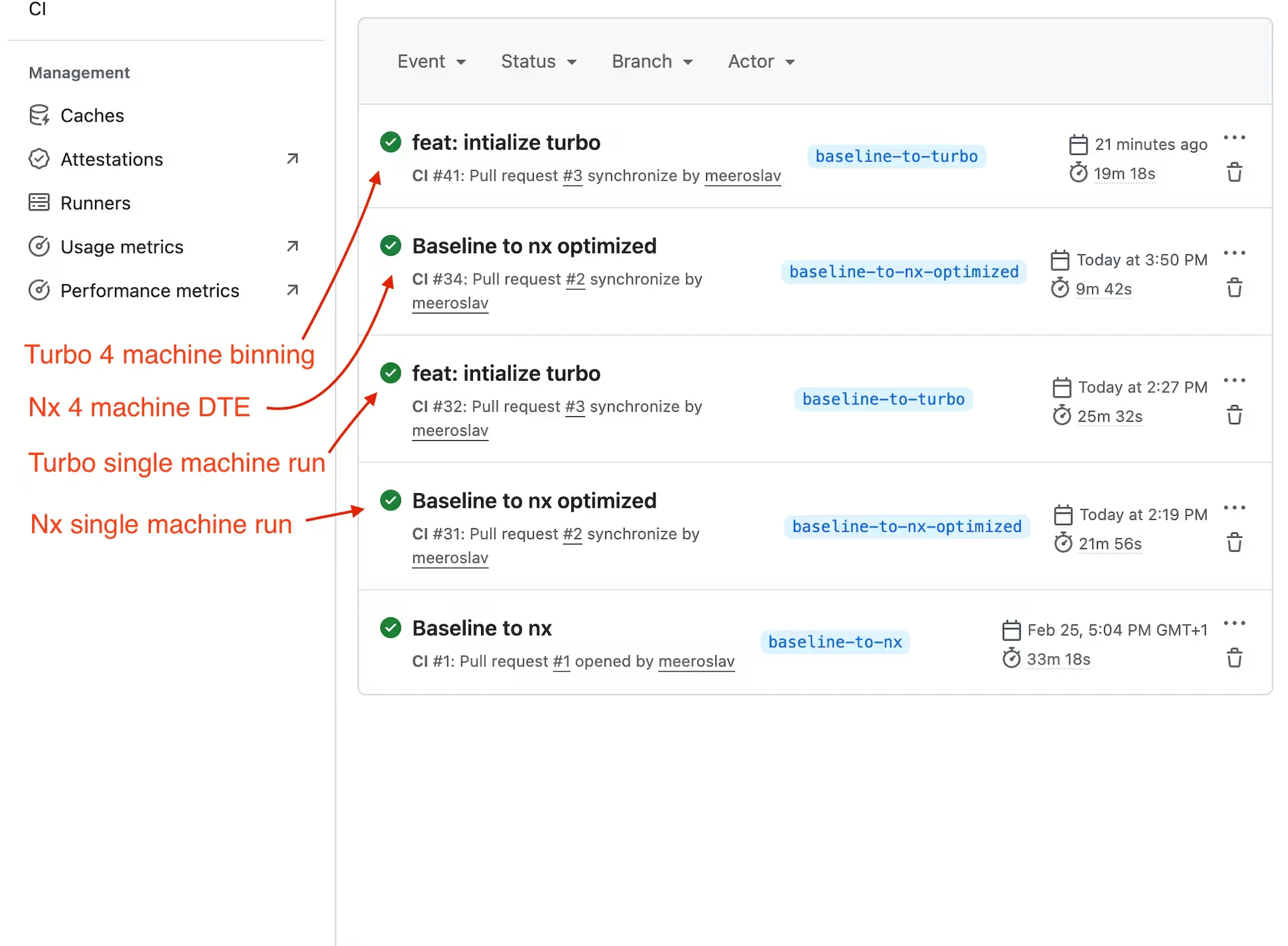
Distributed CI
Section titled “Distributed CI”When a single machine is no longer enough, the tools diverge significantly.
Workers split work across multiple CI machines at the individual task level, dynamically balancing load based on historical timing data. The scheduler keeps all agents busy with minimal idle time.
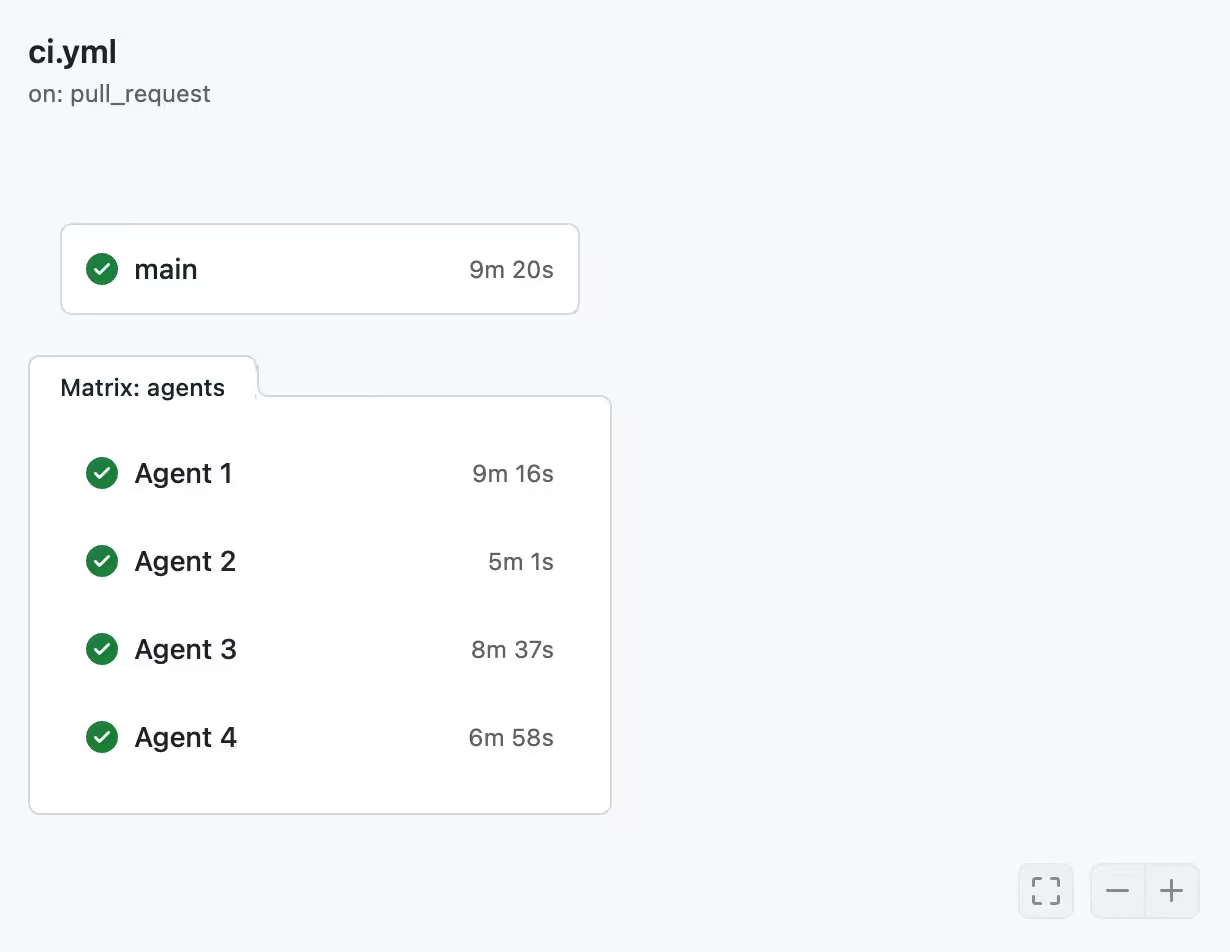
Turborepo has no built-in distribution. Scaling to multiple machines requires manual "binning," where you statically assign tasks to runners and rebalance by hand as the codebase evolves.
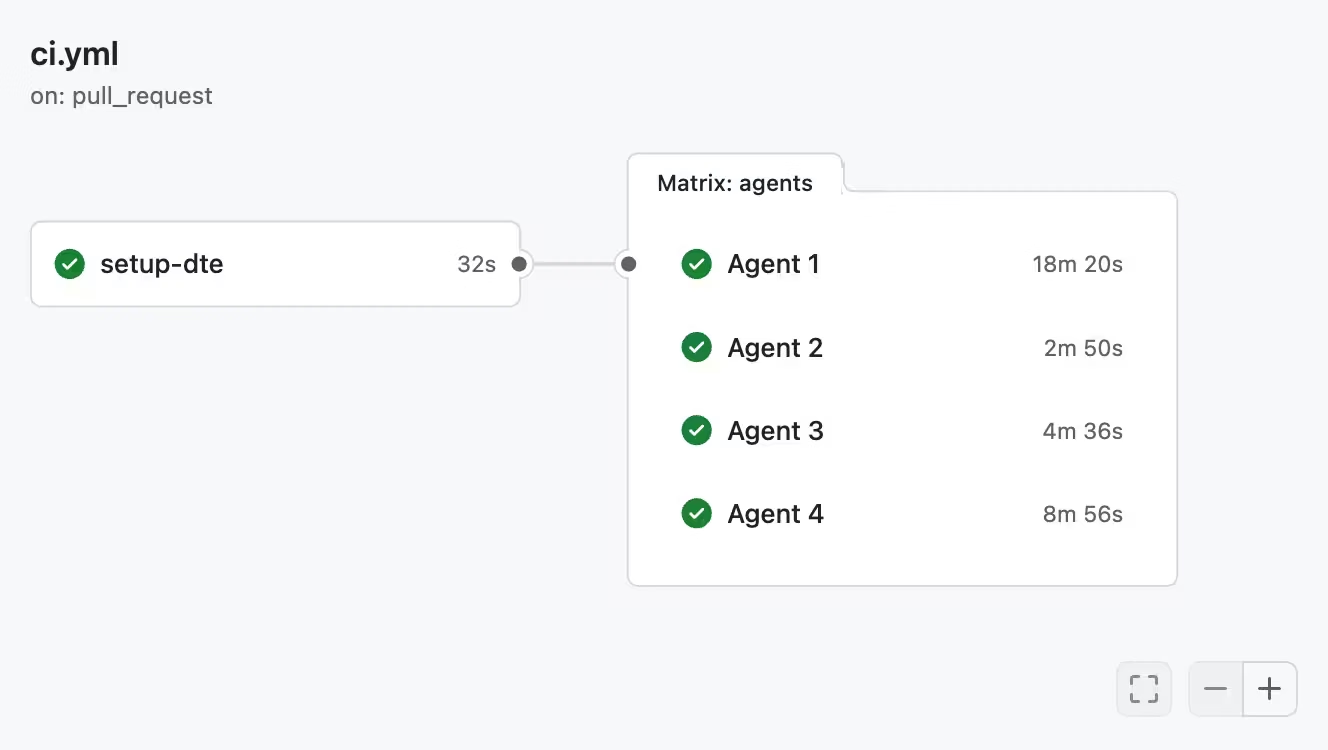
With static binning, one agent finishes early and sits idle while another carries the long tail, and the imbalance grows with more machines.
The core difference is declarative vs imperative:
- With Nx you declare what should run on CI, and Nx Cloud figures out the optimal distribution automatically. Workers adapt automatically and get smarter over time.
- With Turborepo, you imperatively assign tasks to machines and maintain that mapping as the codebase evolves.
To learn more about distribution on CI, read Distribute Task Execution (Workers).
Nx also provides Atomizer, which automatically splits slow e2e and integration test suites into per-file tasks that can run in parallel across machines. For more information, see split e2e tasks.
CI throughput
Section titled “CI throughput”Raw CI speed is one part of throughput. The other is avoiding failed PRs. A failing PR means a developer has to stop, inspect logs, provide a fix, push again, and wait for another CI run. As AI agents ship more PRs, CI quickly becomes the bottleneck.
Nx Cloud's self-healing CI places a specialized AI agent on CI that analyzes failures, proposes fixes, and auto-applies verified fixes. This reduces friction on the developer side, allowing PRs to move forward without manual intervention.
Flaky task detection identifies flaky tests and re-runs them in isolation, preventing false failures from blocking your pipeline.
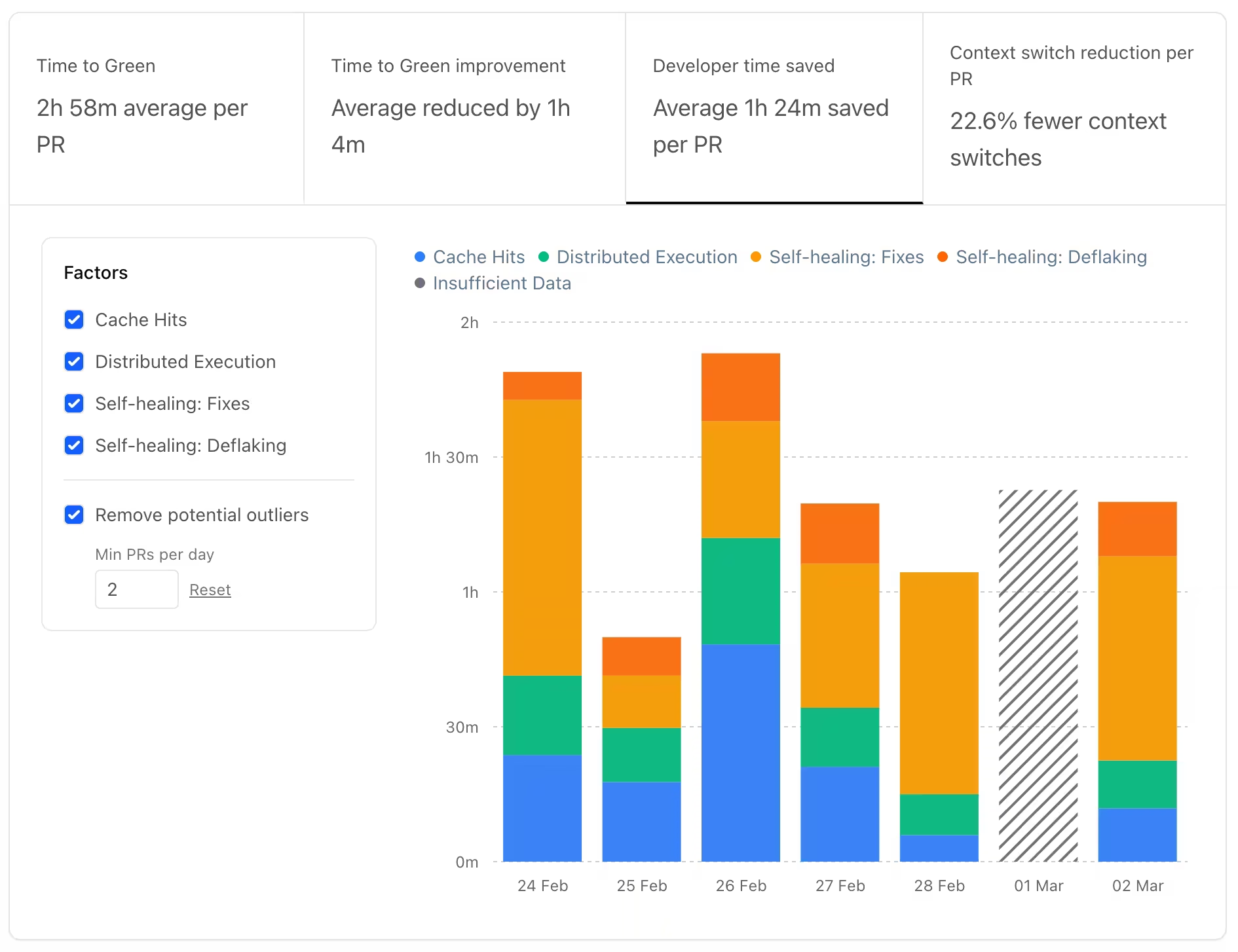
The metrics shown above are extracted directly from the Nx Cloud dashboard.
Turborepo offers neither. A flaky test fails the build, and every failure requires a full human round trip.
Observability
Section titled “Observability”Both tools offer visibility into your pipelines, but through different models.
Nx Cloud provides integrated dashboards out of the box. You get detailed run reports, timing data, cache hit/miss trends, and historical performance analysis without any external setup. These insights are also queryable via the MCP server, letting AI assistants analyze CI performance conversationally.
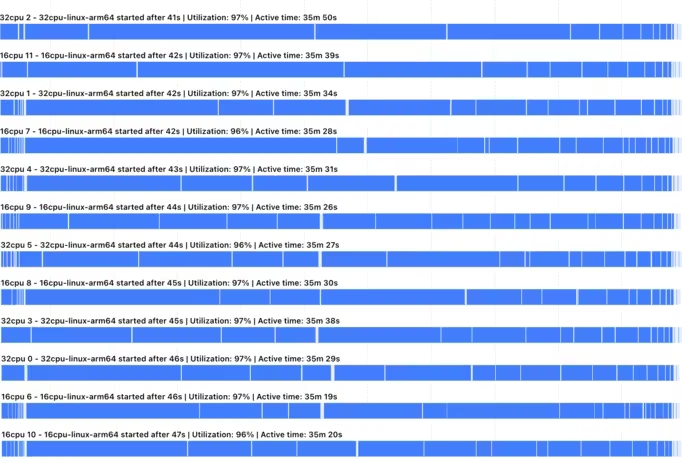
Worker utilization chart, showing even distribution across CI runners.
For deep dives into resource utilization, see Resource Usage.
Turborepo exposes run metrics via experimental OpenTelemetry (OTLP). This is useful if you already have a mature observability stack (like Datadog or Grafana) and want to route build metrics into it, though it requires significant manual setup and maintenance of your own collector and visualization layer.
Release management
Section titled “Release management”Versioning and publishing libraries in a monorepo is a complex orchestration task. You need to identify what changed, determine the next version for each package, update internal dependencies, generate changelogs, and publish to registries.
Nx provides a first-party, unified release system via nx release that automates the entire lifecycle of versioning, changelog generation, and publishing with a single, highly configurable command.
Turborepo has no built-in release solution. Teams usually end up manually configuring third-party tools like Changesets or Lerna, adding another layer of manual setup and tool maintenance to the workspace.
Developer experience
Section titled “Developer experience”Project graph
Section titled “Project graph”Both tools can visualize the dependency graph, but the implementations differ significantly at scale. Turborepo renders every node at once, which becomes unreadable past a few dozen projects. Nx provides an interactive graph that lets you filter, group, and search projects, then drill into any node for details on demand.
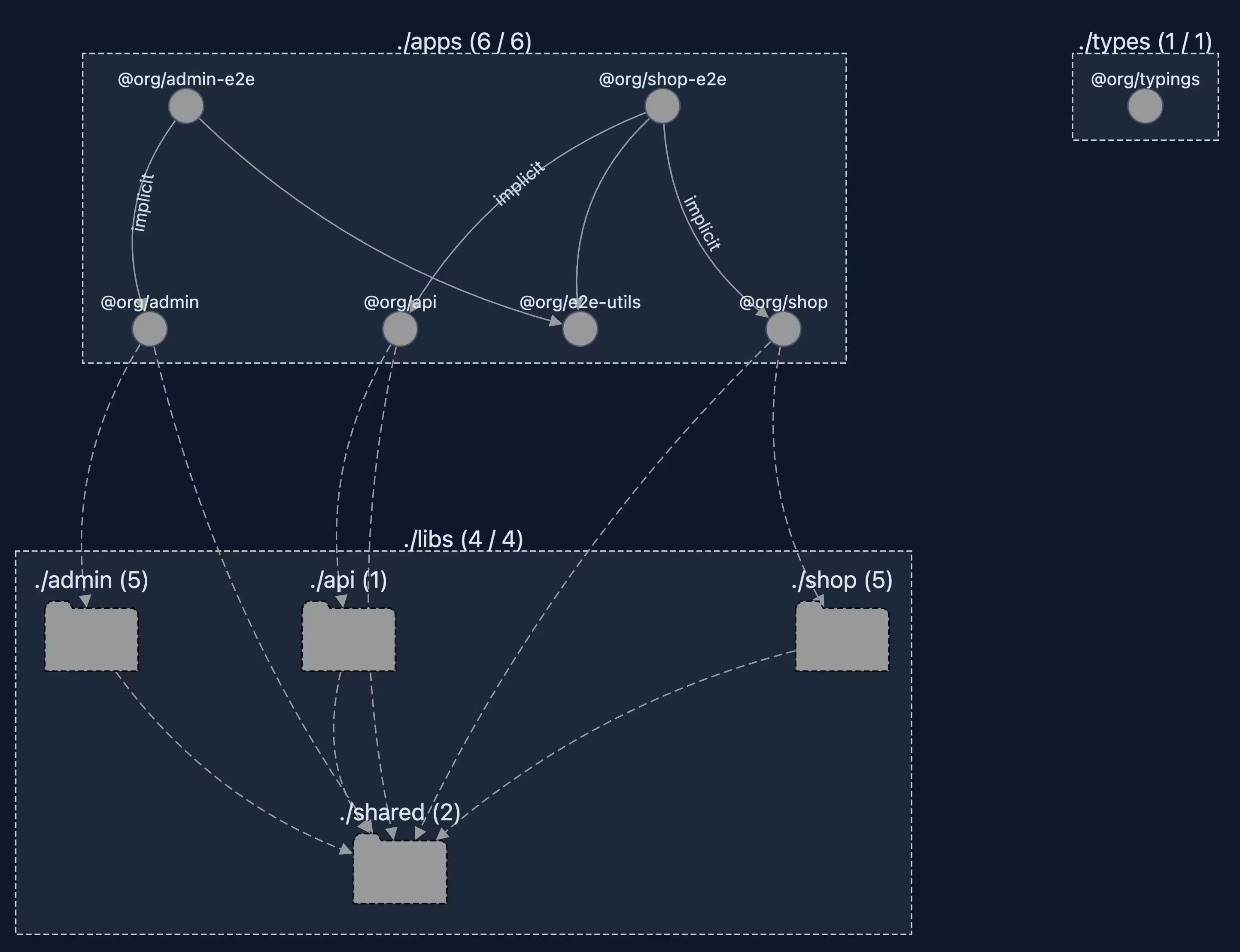
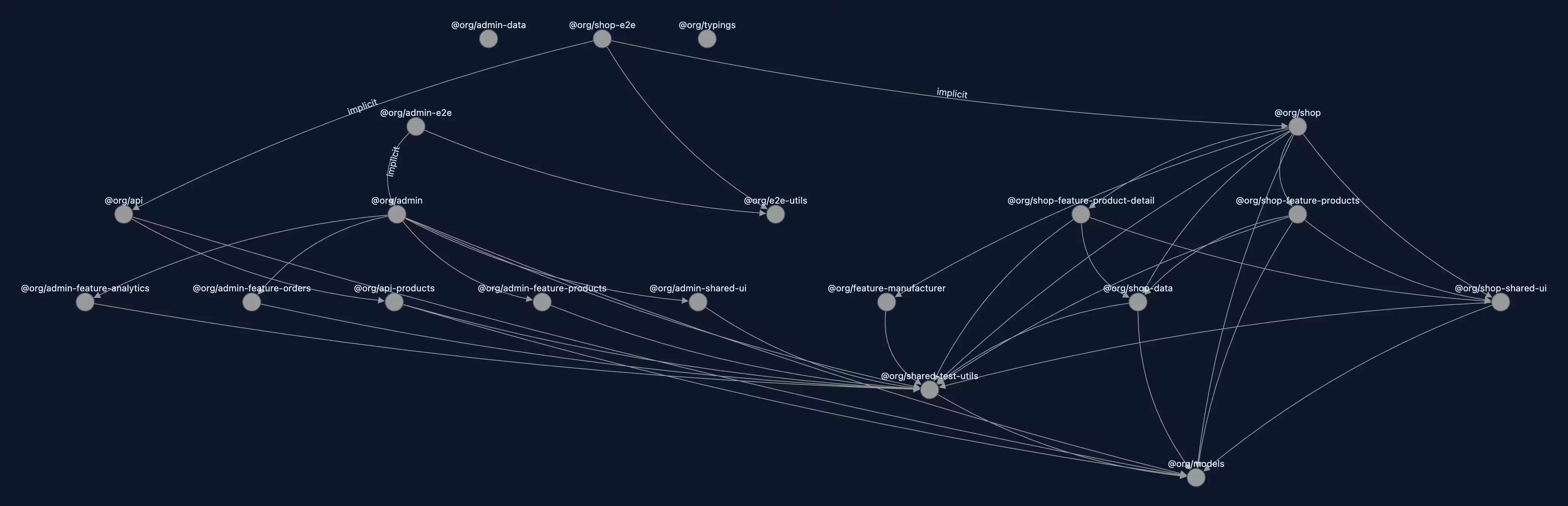
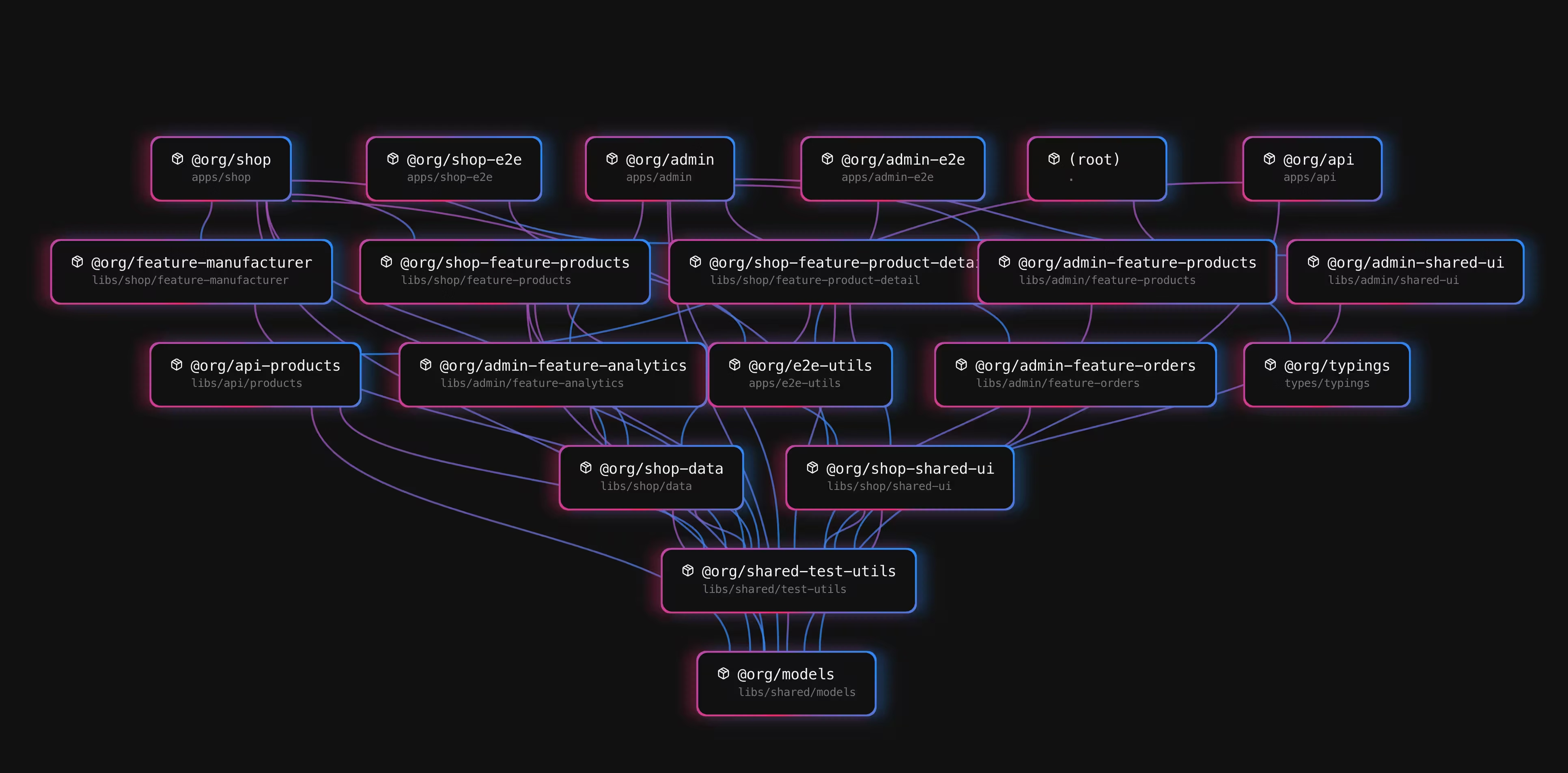
The Nx graph is also available inside Nx Console, so you can explore dependencies without leaving your editor.
Terminal UI
Section titled “Terminal UI”Nx ships with a full terminal UI that adapts to what you're running. For multi-task runs, it shows a task overview with filtering, pinning, and layout switching. For a single task with no dependencies, it drops into a simplified view with the output front and center. Colors, order, and indentation from your underlying tools are preserved.
Turborepo has a more simplified version of a TUI which shows task output in a split view. You can opt-in to that TUI experience.
IDE extensions
Section titled “IDE extensions”Nx Console provides extensions for VS Code and WebStorm/IntelliJ with close to 2 million installations. You can run tasks, explore the project graph, scaffold with generators, and inspect Nx Cloud CI runs directly from your editor. It also includes a language server that provides autocompletion in nx.json and project.json files.
Turborepo provides basic LSP support for turbo.json.
Who should pick which
Section titled “Who should pick which”Pick Nx when any of these apply:
- You want caching and affected detection without writing task configuration.
nx initsets it up,nx run-manyandnx affectedrun it, and the completenx.jsonfor a ten-package workspace is onetargetDefaultsblock. - You are a small team and want the configuration to stay small. There are no per-package task declarations to write and no input lists to repeat, so adding a package adds no configuration.
- You expect the workspace to outgrow one CI machine, gain a second language, or start publishing packages. Distributed CI, polyglot plugins, and
nx releaseare already in the tool when you get there. - You want an interactive project graph, editor integration, and AI agents that can read the same graph.
Pick Turborepo when any of these apply:
- Your workspace is JS/TS-only and will stay that way, and one CI machine keeps your pipeline short enough that you never need to distribute it.
- Task running and caching are all you want from a build tool, with no code generation, release management, module boundaries, or CI beyond remote caching on the roadmap.
Team size is not the dividing line. A small team gets the same nx.json and the same nx affected as a large one, and what the large one adds later is distribution with Ultracache and self-healing CI.
Nx adopts incrementally on your existing scripts, and nx init reads an existing turbo.json and converts it, so moving over later is not a rewrite. Setting up either tool takes about the same effort, and nx init plus plugins make the Nx side easier, so there is little reason to start on Turborepo first.